How to Build Better Product Filters for Technical Ecommerce
7/8/2026
Technical ecommerce filters only work when product attributes are normalized, buyer-focused, and reviewed before they reach the storefront. Here is a practical distributor workflow.
Filters are one of the fastest ways to make a technical catalog feel useful. They let a maintenance buyer narrow thousands of SKUs by diameter, voltage, thread type, material, load rating, seal profile, certification, or compatibility without waiting for a sales reply. But filters are also one of the easiest ecommerce features to get wrong. If the underlying product data is inconsistent, the storefront simply exposes that inconsistency to the buyer.
For an industrial distributor, better filters are not mainly a design project. They are a product-data workflow. The job is to decide which attributes answer real buyer questions, normalize supplier values into a controlled model, review edge cases, and only then publish filters into Shopify, BigCommerce, Adobe Commerce, a PIM, or a custom B2B portal.
This guide explains how to build filters that help technical buyers move from “I know the job” to “I found the right item” with less manual support.
Quick skim: what makes a good technical filter?
It matches a buyer decision, not merely an available supplier column.
Values are normalized: units, spelling, abbreviations, ranges, and synonyms do not split the same concept into multiple filter choices.
The filter is category-specific enough to be useful. Bearings, fasteners, seals, springs, tools, and consumables should not all share the same generic attribute set.
Source values are preserved for audit, while ecommerce values are clean enough for display and import.
Someone owns review rules for exceptions, missing values, and new supplier formats.
Start with buyer questions, not supplier columns
Many distributor catalogs inherit their filter candidates from ERP fields, supplier spreadsheets, or whatever column names appear in a PDF. That is understandable, but it produces noisy storefronts. A supplier column called “style,” “type,” or “series” may be essential in one category and meaningless in another. A field called “size” may represent nominal thread diameter for one product family, outer diameter for another, and package size for a consumable.
A better starting point is the buyer question. For each product family, list the questions a qualified buyer asks before they can choose confidently. A fastener buyer may care about thread size, length, head style, drive type, material, finish, grade, and standard. A seal buyer may care about inner diameter, cross section, material compound, hardness, chemical compatibility, and operating temperature. A tool buyer may care about shank size, cutting diameter, coating, application, and compatible machine.
If a filter does not help a buyer eliminate wrong products or confirm fit, it is probably not a filter. It may belong in the description, specification table, search synonyms, or internal review notes instead.
Separate source values from storefront values
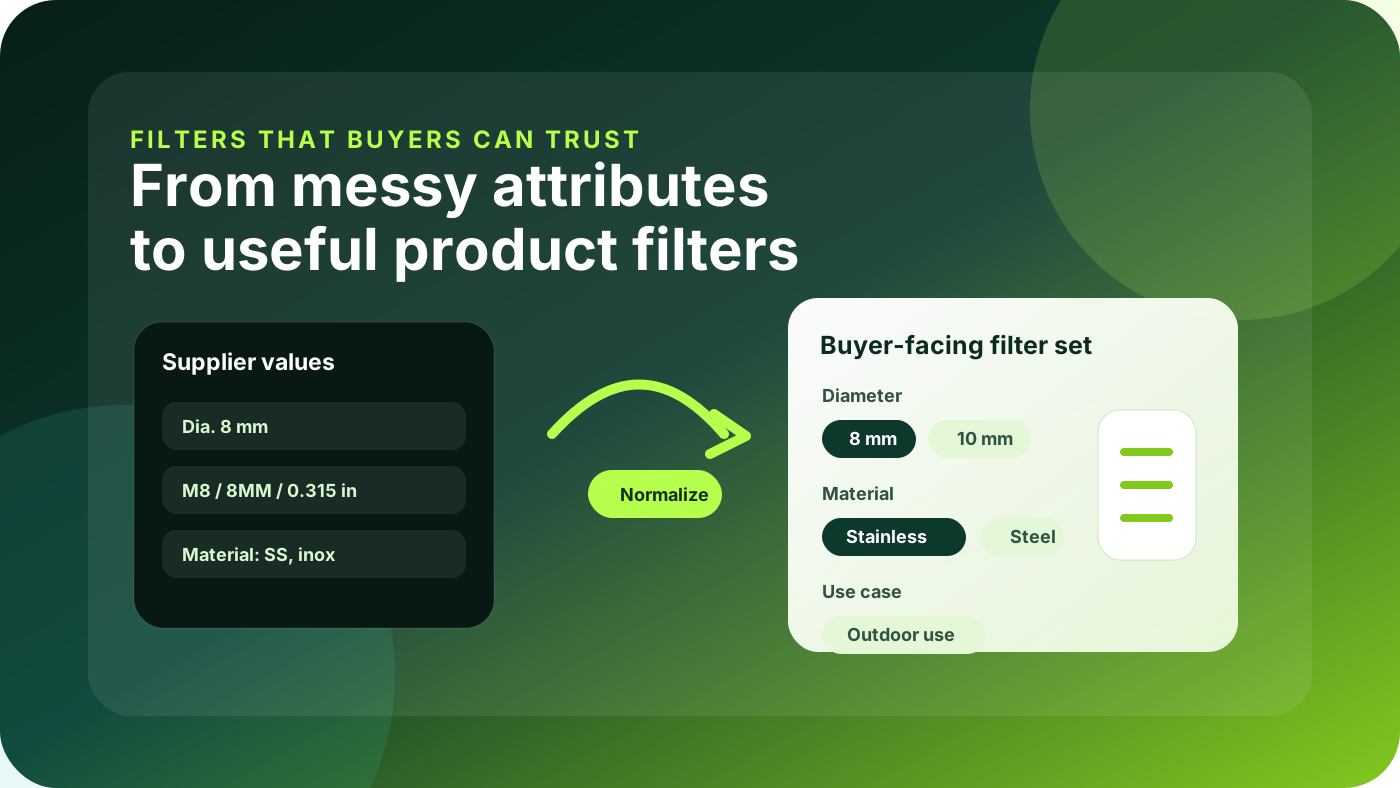
Supplier documents rarely use one neat vocabulary. The same attribute can appear as “stainless,” “SS,” “inox,” “A2,” or “304.” Diameter can arrive as “8 mm,” “8mm,” “Ø8,” “0.315 in,” or a nominal code. If every variation becomes a separate filter option, buyers get a long list that looks comprehensive but behaves badly.
Keep two layers. The source layer stores what the supplier actually provided, with file reference, page, row, or column context. The storefront layer stores the reviewed value you want buyers to see and platforms to import. That separation is especially important when product data automation is involved. AI extraction can help collect candidate values from PDFs and spreadsheets, but a review workflow should decide the canonical ecommerce value.
Do not publish raw values
Raw source values are useful evidence, but they are not automatically buyer-ready filters.
“SS”, “S/S”, and “stainless steel” appear as three materials.
Metric and imperial values mix without conversion rules.
Supplier family names become confusing filter labels.
Publish reviewed values
A reviewed filter model gives buyers a short, predictable set of choices.
Material: Stainless steel, Zinc-plated steel, Nylon.
Diameter: canonical numeric value plus display unit.
Series and compatibility labels are category-specific.
Build a filter scorecard before implementation
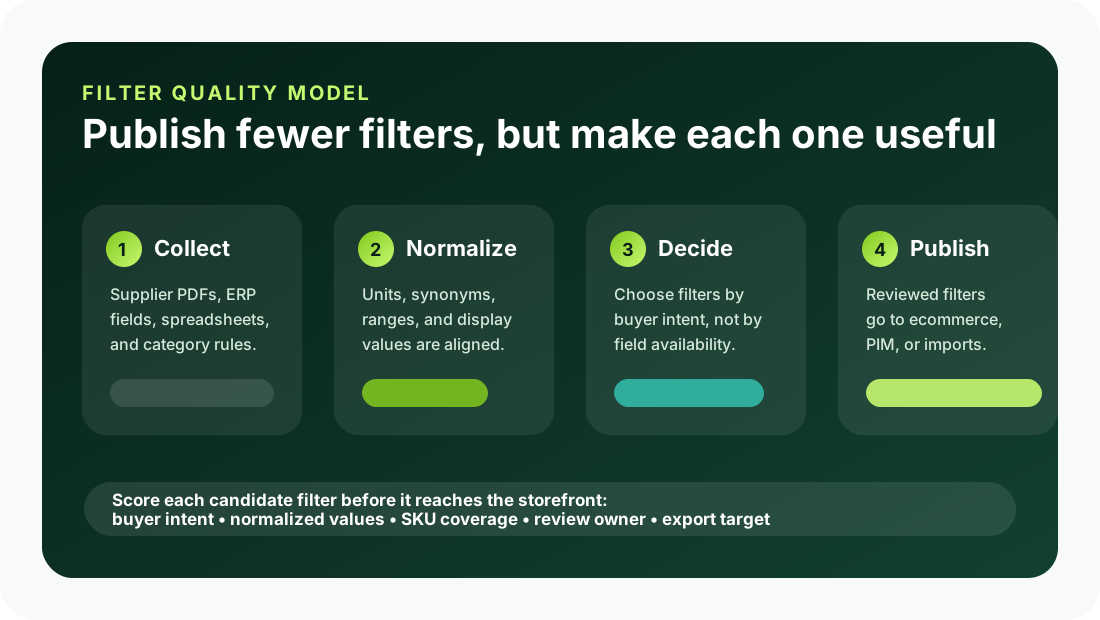
Before adding a new filter to ecommerce, score it against five practical criteria. This prevents the common mistake of publishing too many low-value filters simply because the data exists somewhere.
Criterion | Question to ask |
|---|---|
Buyer intent | Does this filter answer a real selection question for this product family? |
Data coverage | Do enough SKUs have reliable values for the filter to be useful? |
Normalization | Can equivalent values be grouped into a controlled vocabulary or numeric range? |
Review effort | Who will approve exceptions, conflicts, and missing values before publishing? |
Export target | Where does the final value go: ecommerce filter, PIM attribute, metafield, tag, or description? |
A filter does not need to be perfect on day one, but it should have a clear owner and a visible path to improvement. If the coverage is low, publish it only for the category where it works. If the vocabulary is messy, normalize the values before the import. If the filter is important but high-risk, start with an internal review field before making it public.
Design filters around category models
Technical ecommerce works best when each category has its own attribute model. A global attribute library is still useful, but the storefront should not behave as if every product family is selected in the same way. Buyers compare springs differently from bearings; bearings differently from fasteners; fasteners differently from adhesives or safety consumables.
A practical model includes required attributes, optional attributes, units, accepted values, display labels, search synonyms, validation rules, and export destinations. For example, “material” may be a controlled list in many categories, while “operating temperature” may need numeric minimum and maximum values with units. “Compatibility” may need a free-text source note plus reviewed tags for common machines or standards.
This is where an upstream product-data workflow pays off. Instead of cleaning filters directly inside the ecommerce admin, extract and normalize the data in a staging layer, review exceptions, and then export clean values into the platform. If you are planning a larger cleanup, connect this work to your product data automation workflow rather than treating it as a one-off catalog-editing task.
Avoid the most common filter mistakes
Using ERP fields as storefront filters without checking whether buyers understand the labels.
Publishing filters with dozens of near-duplicate values because supplier abbreviations were not normalized.
Mixing numeric values and text values in the same field, which breaks sorting, ranges, and future AI search.
Adding global filters that appear on categories where they have little coverage or no selection value.
Deleting source values during cleanup, making it hard for sales or product teams to audit why a value changed.
Assuming “more filters” means better discovery. In technical catalogs, fewer trusted filters usually outperform many weak ones.
Run a focused pilot before changing the whole catalog
Choose one product family with meaningful ecommerce demand and enough messy attributes to prove the workflow. Export the current product set, collect supplier documents, map the buyer questions, define the target filter model, and normalize values in a staging table. Then review a sample with sales, customer service, ecommerce, and product specialists before publishing.
Measure practical outcomes: fewer “which one do I need?” calls, improved search refinement, fewer dead-end filter combinations, faster product onboarding, and less manual rework before imports. The goal is not to automate every attribute immediately. The goal is to create a repeatable method for turning supplier facts into buyer-facing filters.
Where Arovon fits
Arovon helps distributors turn supplier PDFs, spreadsheets, and catalog files into structured product data that can be reviewed and exported. For filter work, that means extracting candidate attributes, preserving source context, normalizing units and labels, and giving teams a cleaner staging layer before values reach ecommerce.
If your team is preparing a storefront refresh, Shopify metafield cleanup, PIM implementation, or catalog automation pilot, better filters are a high-leverage place to start. Request a demo to see how Arovon can support a review-first workflow from supplier documents to ecommerce-ready product data, or compare options on the pricing page.