How to Normalize Units Across Supplier Catalogs
7/6/2026
Mixed inches, millimeters, pounds, packs, cases, and shorthand unit labels quietly break industrial ecommerce. Here is a practical way to normalize supplier catalog units without losing the source evidence buyers and sales teams need.
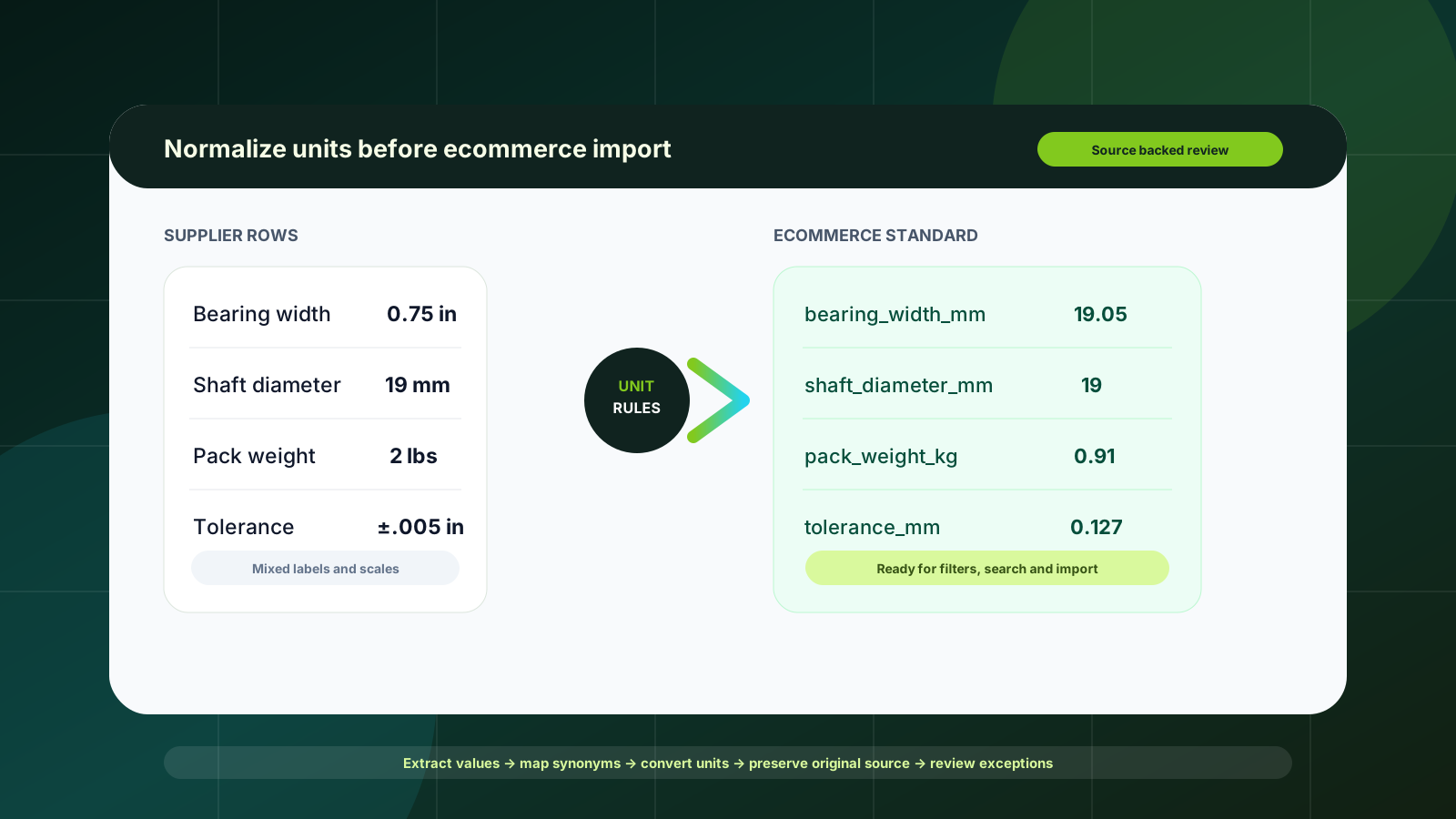
Unit normalization looks like a small catalog-cleanup detail until the same bearing width appears as 0.75 in, .750”, 19.05 mm, 19 mm nominal, and three-quarter inch across different supplier files. Search filters become unreliable. Product comparisons look inconsistent. Imports fail because one system expects a number and another receives a phrase. Sales teams stop trusting the ecommerce catalog because they have to re-check basic dimensions anyway.
For industrial distributors, the goal is not to force every supplier into the same template overnight. The goal is to create a repeatable layer where units are detected, converted, reviewed, and exported while preserving original evidence. That makes the catalog more searchable and gives product and sales teams confidence that no important technical meaning was lost.
Quick skim: the unit normalization job
What to standardize
Dimensions, weights, volumes, pressure ratings, torque, speed, temperature, packaging quantities, and tolerances.
Unit labels and aliases such as inch, in, inches, double quotes, mm, millimetres, lbs, pounds, kg, case, box, and pack.
Numeric precision rules by product family, not one global rounding rule for every attribute.
What to preserve
The supplier’s original value and unit exactly as received.
The source file, page, row, or snippet that supports the conversion.
A review status so exceptions are visible before rows reach Shopify, BigCommerce, Adobe Commerce, a PIM, or ERP import.
Why mixed units create real ecommerce problems
B2B ecommerce guidance in 2025 and 2026 keeps pointing to the same pattern: buyers expect self-service, accurate product facts, and connected experiences across web stores, ERP-backed inventory, quote workflows, and sales channels. BigCommerce’s B2B trend coverage calls out poor product data, manual quote processes, and fragmented systems as blockers for better digital experiences. Sana Commerce emphasizes storefronts that show accurate ERP-backed facts. Unit quality is one quiet data issue underneath those larger trends.
When units are inconsistent, the catalog loses functional value. A buyer filtering for 20 mm shaft diameter may miss a relevant item listed as 0.787 in. A comparison table may show one motor in horsepower, another in watts, and a third in free text. A CSV import may reject symbols in numeric fields. A product manager may manually fix the same unit aliases that should have been handled by rules.
Normalize units for the buyer-facing job the data must do: search, filtering, comparison, quote support, and clean import — not just for a tidy spreadsheet.
Start with a category-level unit policy
A useful unit policy begins at the product-family level. Fasteners, bearings, springs, hoses, cutting tools, and consumables do not all need the same canonical units or display conventions. A bearing catalog might standardize bore, outside diameter, and width in millimeters while preserving inch equivalents for buyers who search by legacy dimensions.
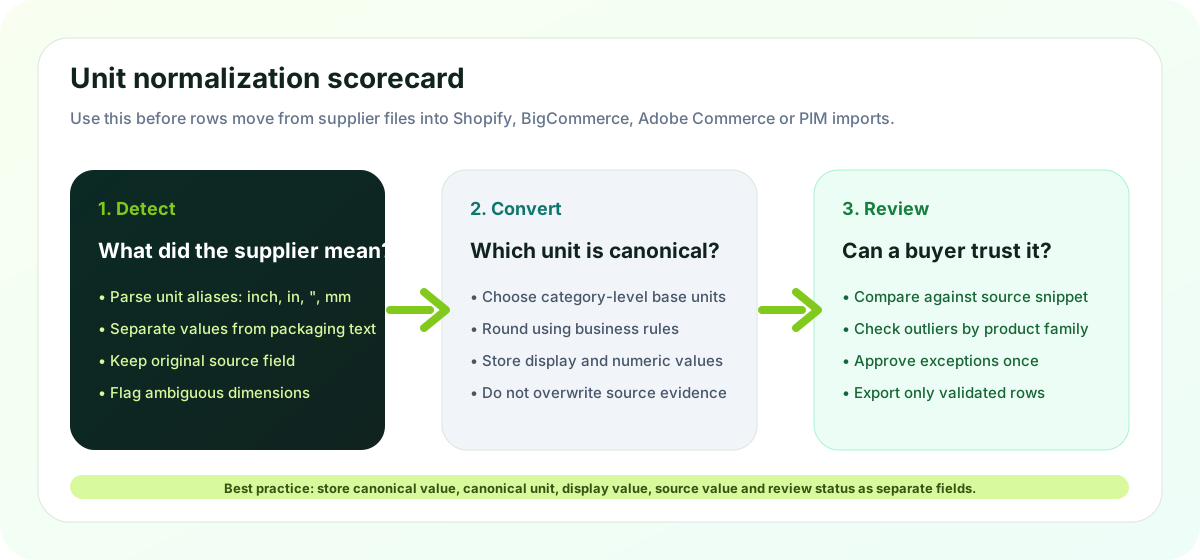
For each product family, define four things before automation begins:
Canonical unit: the unit used for numeric filtering, comparison, and import. Example: millimeters for dimensions or kilograms for weight.
Display unit: the buyer-facing format. This may be the canonical value, the supplier’s original value, or both where buyers expect both systems.
Precision rule: how many decimals are acceptable, and whether nominal values should be rounded differently from measured values.
Exception rule: which conversions require human review because the source text is ambiguous, ranges are involved, or the attribute affects safety and fit.
Separate five fields instead of overwriting one
The most common mistake is overwriting the supplier’s original value with the normalized value. That creates short-term neatness and long-term distrust. If a sales rep asks where 19.05 mm came from, the team needs to see the original “0.75 in” source value.
A safer staging model keeps separate fields: source value, source unit, canonical numeric value, canonical unit, display value, conversion rule, source reference, and review status. This structure gives ecommerce, catalog, and sales teams the audit trail they need. If a supplier changes a document or a category manager changes rounding policy, the team can re-run the affected rule without losing the evidence.
Build a synonym map before a conversion map
Unit normalization is not only math. It is language cleanup first. Supplier files use aliases, symbols, and shorthand inconsistently. One catalog might use in., another inch, another double quote marks, and another a column called Dim A with no unit at all. Packaging units are trickier: each, pack, case, carton, roll, pair, and set may describe different selling or shipping logic depending on the product family.
Create a synonym map that translates unit labels into controlled names before conversion. Inch, inches, in, in., and double quote can map to inch. Pound, lb, lbs, and # can map to pound only when the attribute context indicates weight, not count or pressure. Context matters because technical catalogs reuse short labels in ways that can mislead blind parsing.
Use automated rules, but review the exceptions
Arovon’s practical position is review-first automation. Straightforward conversions should not consume manual catalog time every week. If the source value is clear, the unit alias is known, and the category rule is approved, the system can propose a canonical value automatically. The review effort should focus on missing unit labels, suspicious outliers, ranges, mixed text-and-number values, and conversions that affect fit or compliance.
Good automation candidates
Known unit aliases with clear attribute context.
Single numeric values such as 2.5 in or 63.5 mm.
Supplier families that reuse the same layout across many rows.
Low-risk display conversions that can be checked in batches.
Review before import
Ranges, tolerances, and symbols mixed into one field.
Packaging units that affect order quantity or price breaks.
Dimensions with no unit in the source column or heading.
Values that fall outside the normal range for the category.
Normalize for ecommerce, not just the database
The final test is whether normalized unit data improves the buyer experience. For each attribute, decide whether it supports search, filters, product comparison, variant selection, quote review, or internal operations only. A temperature rating may need to be searchable and visible. Package weight may be needed for logistics but not as a buyer-facing filter. A source-only supplier phrase may belong in the audit trail rather than the public description.
If you are preparing product data for a new ecommerce launch, unit normalization should sit alongside attribute strategy, product-title cleanup, and source-backed review. If you are already importing to a storefront, start with categories where bad units create the most search misses, quote questions, or import errors. The same workflow can feed a PIM, Shopify metafields, BigCommerce product attributes, Adobe Commerce attributes, or a custom staging table before ERP synchronization.
A practical rollout plan
Choose one product family with high order volume, frequent buyer comparison, and supplier files that repeat often.
Inventory the unit-bearing attributes: dimensions, weights, capacities, ratings, packaging quantities, and tolerances.
Create a category unit policy with canonical units, display rules, precision rules, and exception rules.
Build the synonym map and conversion map from real supplier documents, not from a generic unit list alone.
Run a sample through extraction and normalization, then review outliers with catalog and sales stakeholders.
Export a controlled batch to your ecommerce or PIM staging area and check filters, comparisons, CSV validity, and product-page display.
Turn approved corrections into reusable rules before adding the next supplier or product family.
Where Arovon fits
Arovon helps distributor teams turn supplier PDFs, spreadsheets, and catalog files into structured product data that can be reviewed before it reaches ecommerce. For unit normalization, that means extracting the source value, mapping unit aliases, proposing canonical fields, preserving source evidence, and giving your team a review workflow for exceptions. It is not about hiding uncertainty behind AI-generated copy. It is about reducing repetitive cleanup while making product data easier to trust.
If mixed supplier units are slowing down your catalog work, start with a focused pilot. Pick one product family, define the rules, and measure how many rows can move from supplier document to reviewed ecommerce-ready data. Request a demo or review Arovon pricing to see how a source-backed workflow could fit your team.