PIM vs Product Data Automation: Which Comes First for Distributors?
7/9/2026
A PIM can govern trusted product records, but it is not the same thing as cleaning messy supplier PDFs, spreadsheets, and ERP item data. Here is how distributors should sequence product data automation and PIM work.
Quick answer
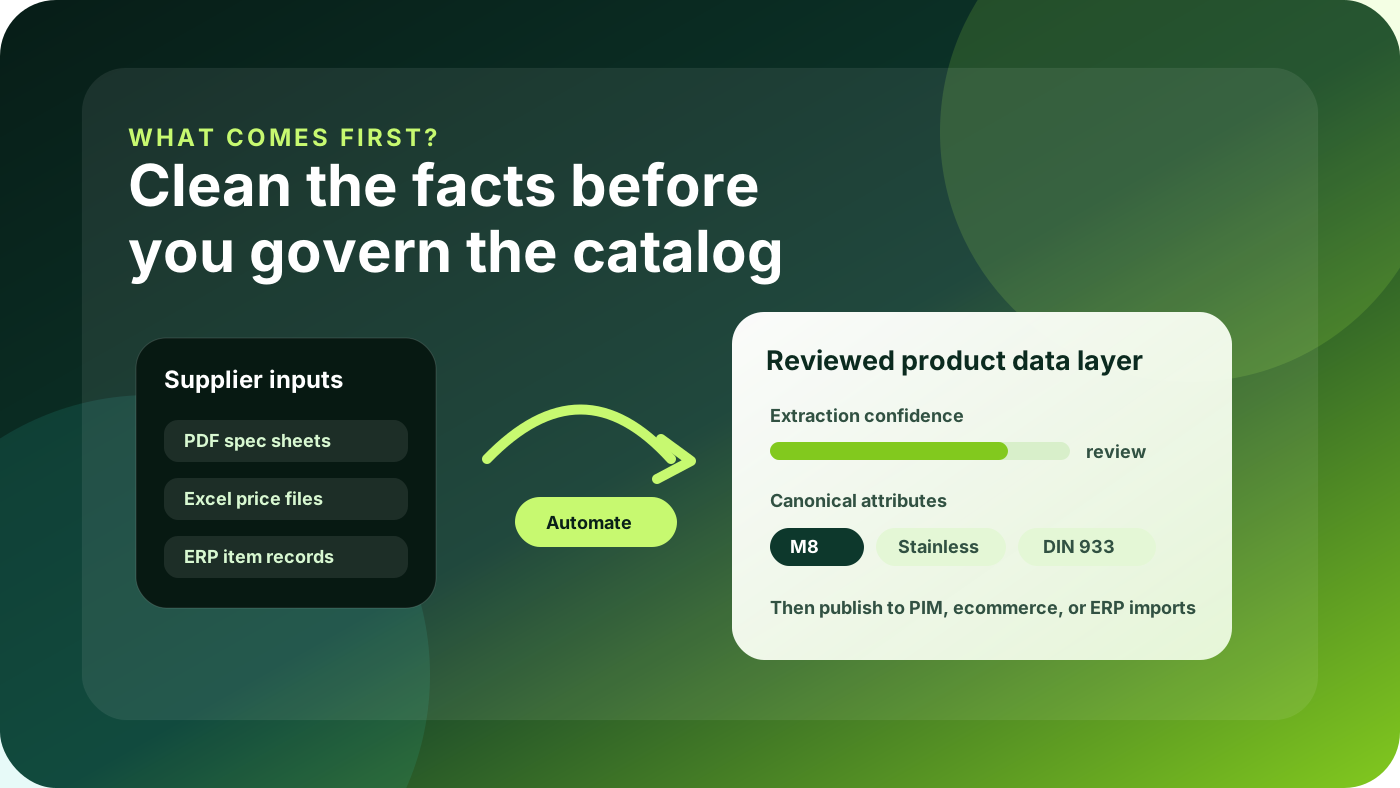
Most distributors should clean and automate the product-data intake layer before asking a PIM to become the source of truth. PIM works best when it receives reviewed, normalized records—not when it becomes the place where every supplier PDF problem is parked.
Use PIM for
Ownership and governance
Channel publishing rules
Taxonomy, enrichment workflows, and approvals
Use automation for
Extracting supplier documents
Normalizing attributes and units
Flagging exceptions before import
A common distributor question sounds simple: should we buy or expand a PIM first, or should we automate product data cleanup first? The answer matters because the wrong sequence can turn a good PIM into an expensive cleanup queue. Teams import thousands of half-structured supplier rows, create duplicate attributes, and then wonder why ecommerce filters, descriptions, and product families still feel inconsistent.
The practical answer is not “PIM or automation.” It is sequencing. Product data automation prepares messy supplier and ERP inputs for review. PIM governs trusted product records after the data is usable enough to manage. When those jobs are separated, catalog teams can move faster, ecommerce managers get better fields, and the PIM implementation has a much cleaner foundation.
Where distributors get stuck
Industrial distributors rarely start with a blank catalog. They already have ERP item masters, supplier PDFs, price files, spreadsheet uploads, legacy website content, and product-family rules held by sales or purchasing. Each source is useful, but none of them is usually enough for a modern ecommerce experience.
ERP records may know SKU, price, stock, vendor, and order rules, but not buyer-friendly attributes.
Supplier PDFs contain technical facts, but they are locked in unstructured tables, notes, and inconsistent labels.
Spreadsheets are easier to import, but they often mix units, abbreviations, product families, and duplicate values.
Existing ecommerce pages may have descriptions and categories, but not the source-backed facts needed for reliable filters and AI search.
This is why a PIM project can feel disappointing if it is treated as the first cleanup tool. The PIM may offer workflows, validations, attributes, and channel publishing, but someone still has to decide what “dia.” means, whether “SS” should become “stainless steel,” which supplier dimensions are trustworthy, and which fields should become ecommerce filters.
What PIM is good at
A PIM is strongest when the organization already knows the product model it wants to govern. It helps define ownership, approval workflows, channel requirements, completeness rules, translations, digital assets, and downstream publishing. For distributors with multiple ecommerce channels, marketplaces, printed catalogs, or localized sites, PIM can become the operational center for product information.
But PIM is not magic. It does not automatically understand every supplier document, resolve every unit conflict, or infer the right ecommerce attribute model for fasteners, bearings, seals, springs, tools, and consumables. If the intake layer is messy, the PIM becomes a better place to see the mess—not necessarily a faster way to fix it.
PIM should govern trusted records. Product data automation should create and verify those records from messy supplier inputs.
What product data automation is good at
Product data automation sits upstream. It helps catalog teams turn supplier documents, spreadsheets, and legacy item data into structured rows that can be reviewed before anything reaches PIM or ecommerce. For Arovon’s target workflow, that usually means extraction, normalization, confidence checks, exception handling, and export-ready formatting.
Extract product facts from supplier PDFs, spreadsheets, or source files.
Normalize units, names, abbreviations, and category-specific attribute values.
Compare extracted facts against ERP or existing ecommerce records where possible.
Flag uncertain values for human review instead of blindly publishing them.
Export clean records to a staging table, PIM, Shopify, BigCommerce, Adobe Commerce, or another import target.
A useful rule of thumb
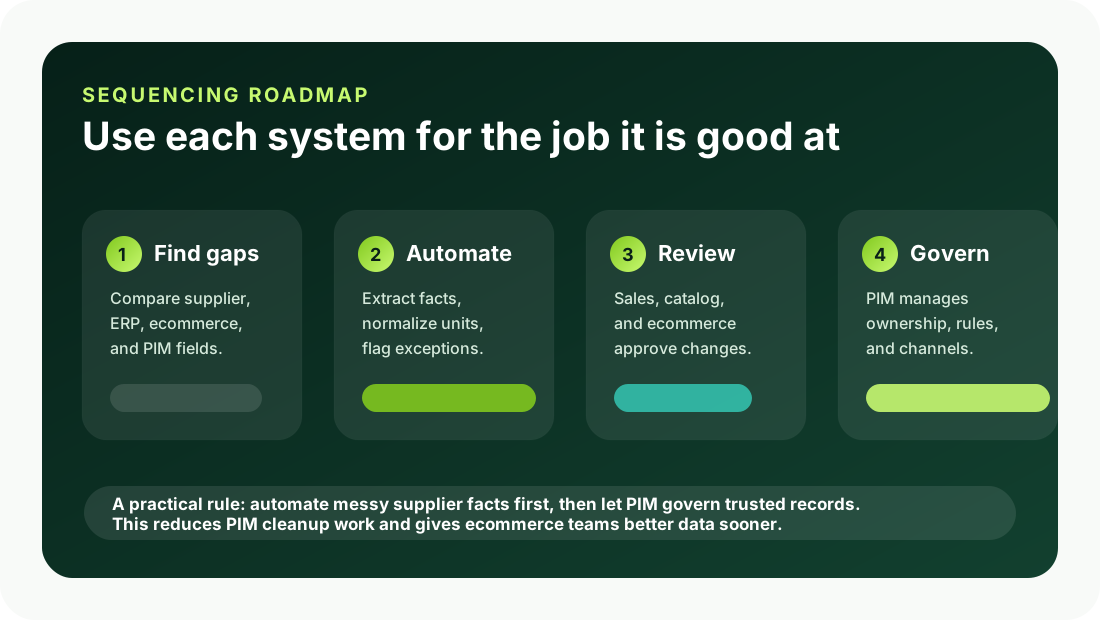
If your main problem is governance, approvals, multi-channel consistency, and ownership of already-structured product records, PIM should be high on the roadmap. If your main problem is that product facts arrive in PDFs, spreadsheets, inconsistent supplier templates, or thin ERP fields, start with product data automation or a staging workflow before expanding PIM scope.
Situation | Start with |
|---|---|
Supplier PDFs and spreadsheets contain most of the missing specs. | Product data automation |
Attributes exist, but ownership, approvals, and channel completeness are inconsistent. | PIM governance |
Ecommerce filters and search are weak because fields are inconsistent or missing. | Automation plus review |
Multiple channels need different descriptions, assets, and completeness rules. | PIM, fed by clean records |
How to sequence the work without slowing the business down
The safest approach is a staged model rather than a platform-first debate. Pick one product family with commercial value, messy but repeatable supplier inputs, and clear ecommerce impact. Build a product data staging table for that family. Then automate the extraction and normalization steps that are causing the most manual work.
Before PIM import
Define required attributes by product family.
Keep source value, normalized value, source reference, and review status separate.
Reject or queue uncertain values instead of hiding uncertainty.
Inside PIM
Assign owners and approval rules.
Map fields to channels and completeness rules.
Manage assets, taxonomy, enrichment, and publishing workflows.
This gives the PIM cleaner inputs and gives the automation project a measurable goal. Instead of trying to “fix the catalog,” the team can measure how many supplier rows were converted, how many exceptions required review, how many attributes reached publishable quality, and how much manual cleanup was removed from the launch path.
What this means for Shopify, BigCommerce, and Adobe Commerce
Modern B2B ecommerce platforms expect structured product data. Shopify metafields, BigCommerce catalog fields, Adobe Commerce attributes, and marketplace feeds all depend on consistent names, values, and units. A PIM can help orchestrate that publishing, but the storefront still suffers if the underlying facts are inconsistent.
For example, “M8,” “8 mm,” “dia. 8,” and “0.315 in” might represent related values, but they cannot be used as reliable filters until the team decides the canonical attribute, unit, display value, and category context. That decision belongs before the data is distributed across channels. Once inconsistent values spread into multiple systems, cleanup becomes slower and riskier.
Where Arovon fits
Arovon is designed for the upstream part of the problem: turning supplier documents and product-data sources into reviewed, structured, ecommerce-ready records. The goal is not to replace every PIM. It is to reduce the manual work and uncertainty that often makes PIM and ecommerce projects harder than they need to be.
For distributors planning a PIM project, Arovon can help prepare product families before import. For distributors already using PIM, it can improve the intake workflow so new supplier catalogs do not arrive as another manual cleanup backlog. In both cases, the principle is the same: do not ask a governance system to solve an intake problem by itself.
The practical next step
Start with a small audit. Choose one commercially important product family and list the fields buyers need for search, filtering, comparison, quoting, and confidence. Then compare those fields against supplier PDFs, ERP records, spreadsheets, PIM fields, and the current ecommerce site. The gaps will usually show which work should come first.
If the gaps are mostly ownership, publishing rules, and channel governance, prioritize PIM. If the gaps are messy source documents, missing specs, inconsistent units, and manual review work, prioritize product data automation before or alongside PIM. If you want help turning supplier files into clean, reviewable product data, request a demo, review pricing, or contact Arovon to discuss a pilot product family.