How to Prepare Supplier Data for Adobe Commerce / Magento
7/28/2026
Adobe Commerce can support complex B2B catalogs, but supplier data must be mapped, normalized, validated, and reviewed before import. Here is a practical preparation workflow for distributors.
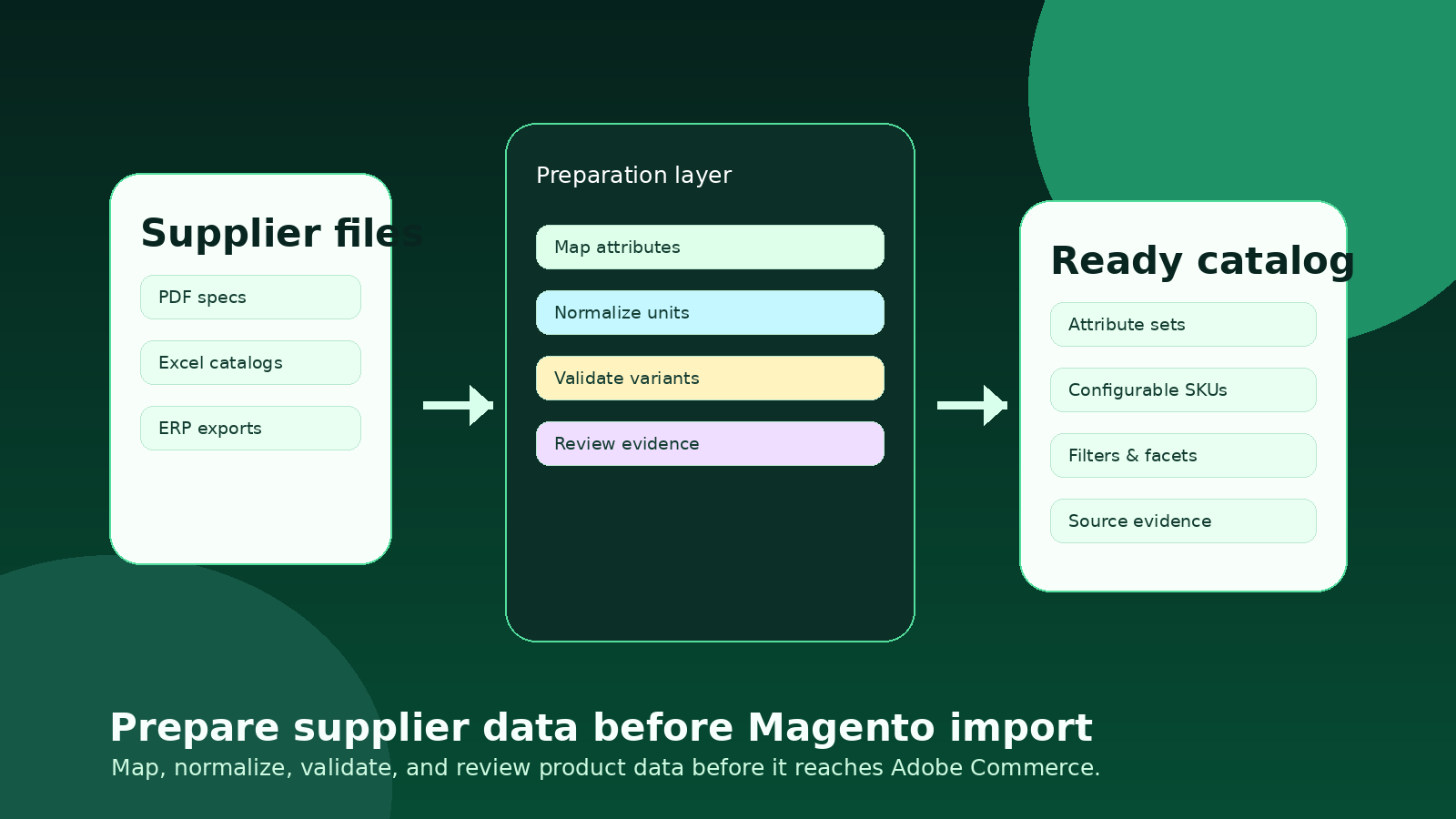
Adobe Commerce, still called Magento by many teams, is capable of handling complex B2B catalogs. That does not mean supplier data can be dropped into it unchanged. Most distributors receive a mix of PDF specification sheets, spreadsheet catalogs, supplier portals, ERP exports, images, and occasional product feeds. Those sources usually describe the same products in different ways: inconsistent units, missing identifiers, alternative option names, vague descriptions, and product families that do not map cleanly to configurable products.
The mistake is treating the ecommerce import as the cleanup step. By then, the team is usually staring at failed imports, broken filters, duplicate option values, child SKUs that do not attach to the parent product, and product pages that technically publish but do not help a buyer decide. The better approach is to build a preparation layer before Adobe Commerce. That layer turns supplier material into reviewed, normalized, import-ready product data.
This guide is for ecommerce managers, catalog managers, and operations leads preparing distributor catalogs for Adobe Commerce or Magento. It focuses on the practical work that should happen before import, not on theme design or checkout configuration.
Quick skim: what needs to be ready before import
Data structure
Attribute sets, required fields, units, option values, variant relationships, media links, and buyer-facing filters are defined before supplier files are transformed.
Review workflow
Exceptions are routed to a human reviewer with source evidence, instead of being hidden inside a spreadsheet or discovered after products go live.
Commerce output
The final export matches Adobe Commerce expectations for simple products, configurable products, categories, attributes, and channel-specific fields.
Start with Adobe Commerce’s product model, not the supplier file
Supplier files are rarely organized around the way an ecommerce system needs to sell. A manufacturer may group products by brochure section, factory series, packaging family, or internal model number. Adobe Commerce needs a cleaner model: product types, attribute sets, categories, visibility rules, configurable parent-child relationships, option values, and fields used for search and layered navigation.
Before converting data, define how the catalog should behave online. For example, should “material” become a filter? Is “finish” a variant option, a descriptive attribute, or both? Should a replacement part be a separate product, an accessory relation, or a cross-sell? Which attributes are mandatory for a product family, and which ones can stay in long-form copy?
Create an attribute-set map by product family, not one generic field list for every SKU.
Decide which attributes will drive filters, comparison tables, internal search, and AI-assisted discovery.
Define configurable product rules before importing child SKUs.
Keep ERP-controlled values such as price and stock separate from buyer-facing enrichment fields.
If the supplier file decides your ecommerce structure, the catalog will inherit the supplier’s operational shortcuts instead of your buyer’s search behavior.
Normalize the values buyers will search, filter, and compare
Adobe Commerce can store many attributes, but it will not automatically turn messy option values into a trustworthy buyer experience. A small unit difference can split a filter into multiple useless options. One supplier says “stainless steel,” another says “SS,” a third says “AISI 304,” and a fourth hides the material in the description. The ecommerce team has to choose canonical values and preserve source context.
Normalization should cover units, naming, abbreviations, decimals, option capitalization, product-family labels, and product identifiers. The goal is not to erase supplier detail. It is to create a consistent layer that lets buyers compare products while still keeping a source-backed trail for reviewers.
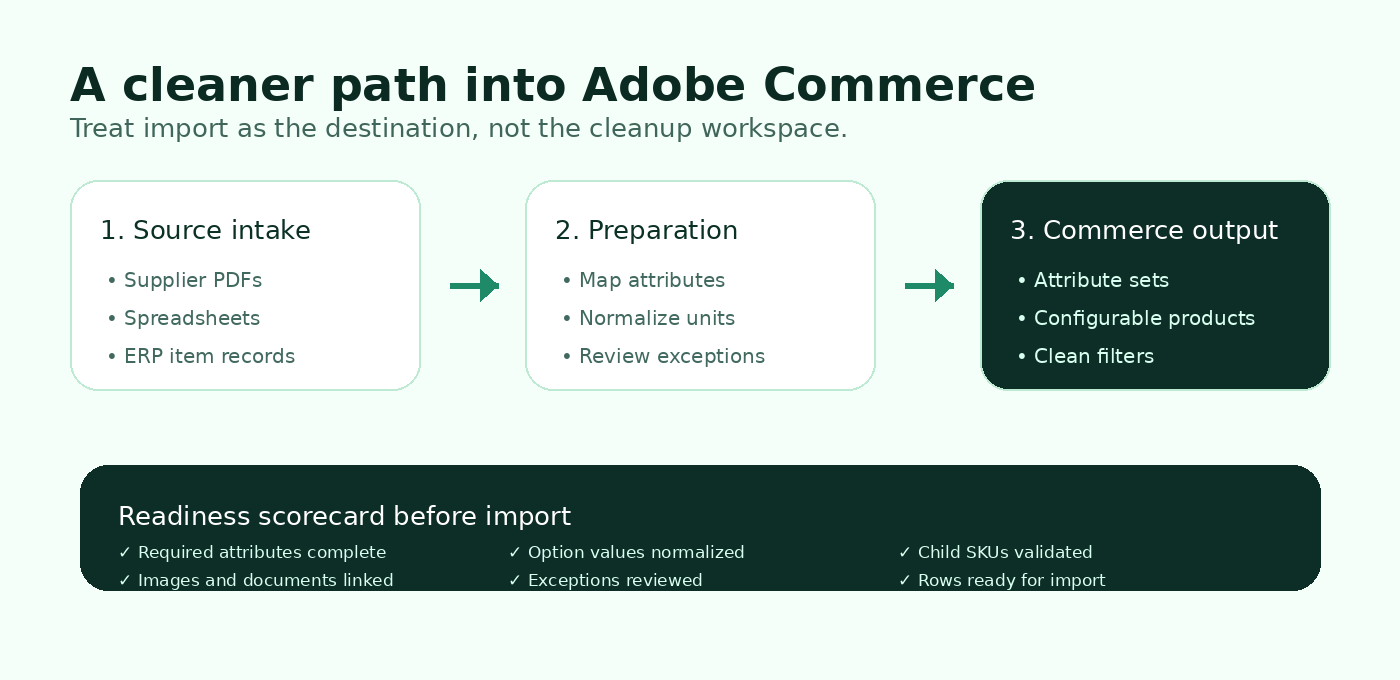
Validate variants before they become catalog debt
Variant logic is one of the easiest places to create expensive cleanup work. If configurable parent products are created from inconsistent supplier rows, buyers may see incomplete size ranges, duplicated options, unavailable combinations, or product pages that do not show the child SKU they need. In B2B distribution, this is especially painful because the same family may vary by size, voltage, material, packaging, connection type, or certification.
A preparation workflow should identify variant dimensions, group child SKUs, check that every child has the required option values, and flag conflicts before import. For example, if a pump family varies by flow rate and voltage, every child SKU should have normalized values for both fields. If supplier documents disagree with the ERP export, the row should move to review rather than silently publishing.
Separate enrichment from ERP synchronization
ERP integration is essential, but ERP data is not the same as ecommerce product content. The ERP is usually strong at item numbers, inventory, price rules, units of measure, and order constraints. Ecommerce needs richer information: searchable names, filterable specifications, comparison attributes, images, documents, product-family context, and clear buyer-facing descriptions.
For many distributors, the best operating model is a staging table between supplier sources, ERP, PIM, and Adobe Commerce. That table can hold normalized attributes, source references, review status, import status, and exceptions. It gives teams a place to improve catalog data without changing the ERP or relying on ad hoc spreadsheet cleanup.
A practical readiness checklist
Ready to import
Every required attribute is present for the product family.
Units and option values match the Commerce attribute setup.
Configurable products have valid child SKU relationships.
Images, PDFs, and datasheets are linked to the correct products.
Needs review
Supplier and ERP sources conflict on a key specification.
A value appears only in free-text descriptions.
A product family has unclear variant dimensions.
An attribute should be a filter but is missing for many SKUs.
Where automation helps, and where review still matters
Automation is valuable when supplier files arrive in repeatable but messy formats. It can extract specifications from PDFs, split product tables, map supplier columns to internal attributes, normalize units, detect missing required values, and prepare export rows for Adobe Commerce. That is a strong fit for Arovon’s workflow: upload supplier documents, extract and normalize product data, review evidence, and export structured data for downstream systems.
The important point is that automation should not remove governance. Technical product data affects buyer confidence and order accuracy. A good workflow highlights exceptions, keeps source evidence visible, and lets a reviewer approve rows before they reach the storefront. That is how a distributor gets speed without turning catalog cleanup into a hidden risk.
A phased approach for distributors
Pick one product family with enough complexity to expose real data problems, but not the most chaotic category in the business.
Define the Adobe Commerce attribute set, required fields, filters, and variant logic for that family.
Run supplier PDFs, spreadsheets, and ERP exports through a staging workflow.
Review exceptions with catalog and product specialists before export.
Import into a test environment, check search, filters, product pages, and configurable behavior, then expand to the next family.
This pilot structure keeps the work measurable. Instead of promising a full catalog transformation, the team can measure import errors avoided, attributes completed, review exceptions resolved, and product pages improved.
Make Adobe Commerce the destination, not the cleanup tool
Adobe Commerce can be a strong platform for complex B2B selling when the catalog data behind it is structured enough for buyers, search, filters, quoting, and account-specific workflows. The preparation work happens before import: mapping, normalization, validation, review, and export governance.
If your team is preparing supplier data for Adobe Commerce, Arovon can help convert supplier PDFs, spreadsheets, and mixed source files into reviewed product data that is easier to import and maintain. Start with a focused product family, then use the workflow to build a repeatable catalog-data pipeline. To discuss a pilot, request a demo, review pricing, or contact Arovon with the supplier data challenge you want to solve first.