How to Prepare Supplier Data for Shopify Metafields
7/23/2026
A practical guide for turning supplier PDFs and spreadsheets into reviewed Shopify metafield definitions and import-ready product data.
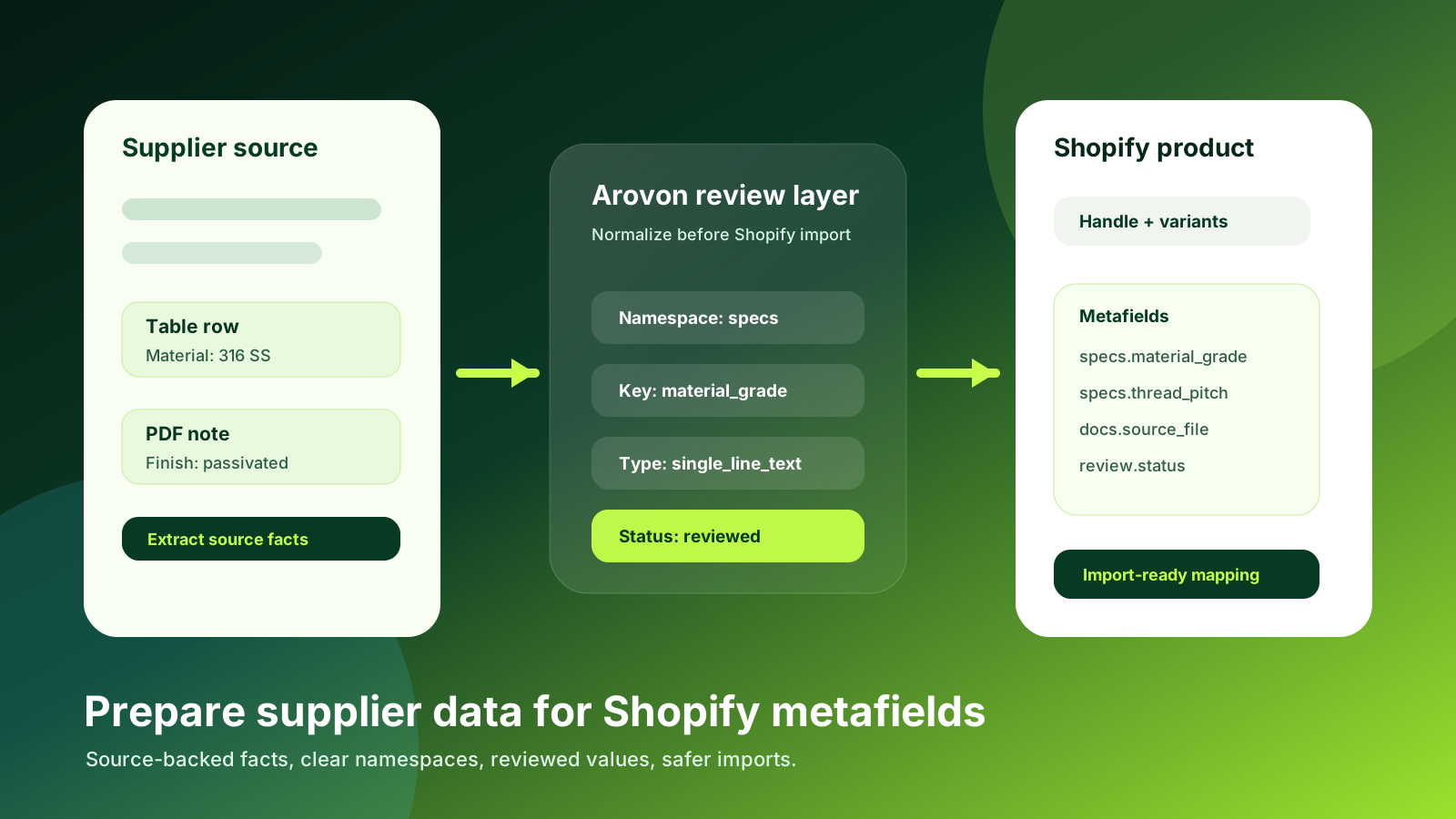
Shopify metafields are often where industrial product catalogs become truly useful. A title, SKU, description, image, and price can get a product online, but technical buyers need more than that. They need material, dimensions, compatibility notes, standards, certifications, datasheet references, tolerance ranges, and sometimes application-specific attributes that do not fit neatly into Shopify’s standard product fields.
For distributors, the hard part is rarely deciding that metafields are useful. The hard part is preparing supplier data so those metafields stay consistent, searchable, governed, and safe to import. If supplier PDFs, spreadsheets, and ERP notes are pushed directly into Shopify, the storefront inherits every spelling difference, unit mismatch, blank value, and uncertain specification.
Arovon sits upstream of that import step. It helps teams extract product facts from supplier documents, normalize them, review exceptions, and export cleaner data for ecommerce workflows. If you are planning a Shopify catalog build or a cleanup before a relaunch, the goal is not “more metafields.” The goal is source-backed product facts that Shopify can display, filter, and manage reliably. See Arovon’s product data extraction workflow if your supplier inputs still arrive as PDFs, spreadsheets, or mixed files.
Fast read
Do not turn every supplier column into a metafield. Start with buyer-visible facts and operationally useful values.
Main risk
Unreviewed supplier data creates duplicate keys, inconsistent units, and storefront facts that sales teams cannot defend.
Best sequence
Extract source facts, normalize names and units, define Shopify keys, review exceptions, then export.
Start with the buyer question, not the supplier column
A supplier file might contain dozens of columns: short descriptions, long descriptions, material notes, finish notes, compliance references, size tables, package quantities, drawings, and internal product families. It is tempting to map each column into a Shopify metafield because the data exists. That usually creates a messy catalog.
A better starting point is the buyer question. What does an engineer, maintenance buyer, purchasing coordinator, or reseller need to confirm before they can choose the product? For industrial products, useful metafields often answer questions such as: Will this fit? What material is it? Which standard does it meet? What operating condition is supported? Is this sold individually, by pack, or by length? Where did the specification come from?
Prioritize attributes that help buyers compare alternatives or avoid a wrong purchase.
Separate product-family attributes from universal attributes. Thread pitch matters for fasteners; durometer matters for O-rings; bore diameter matters for bearings.
Avoid using metafields as a dumping ground for supplier notes that no one has reviewed.
Keep source references when a value came from a PDF table, datasheet, or supplier spreadsheet.
Create a metafield dictionary before import
Before a Shopify import, create a plain dictionary that defines each metafield. The dictionary should include the owner type, namespace, key, label, Shopify field type, expected value format, example values, source priority, and review rule. This is the difference between a catalog that can scale and a catalog that depends on one person remembering how the last import was prepared.
For example, a distributor might use a namespace such as specs for buyer-facing technical specifications, docs for source references, and review for internal publishing status. A field such as specs.material_grade should not compete with material, mat_grade, supplier_material, and material_description unless those are deliberately separate concepts. In Shopify terms, consistent definitions also make it easier to use metafields in themes, collections, filters, and apps without one-off fixes.
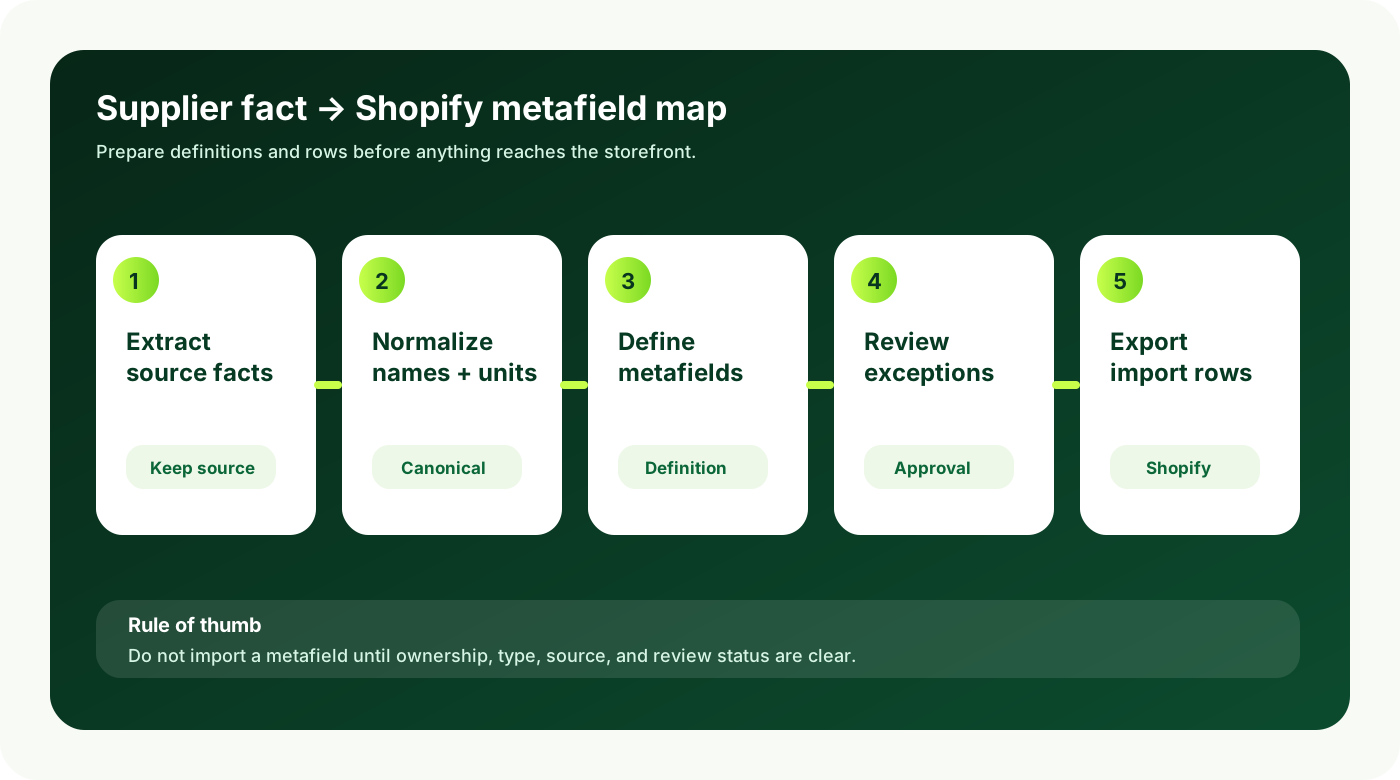
A supplier column should become a Shopify metafield only after you know what it means, who owns it, which format is valid, and whether the value has been reviewed.
Normalize values before deciding field types
Shopify metafield types force useful discipline. A single line of text field behaves differently from a number, measurement, true/false value, URL, file reference, or list. But the correct type is hard to choose when source values are inconsistent. A spreadsheet might contain “stainless,” “SS,” “316 stainless steel,” and “AISI 316” across different rows. Those may or may not represent the same buyer-facing value.
Prepare the values first. Normalize units, expand abbreviations where needed, keep controlled vocabularies for repeated values, and flag cases where the source is unclear. If you need measurement-based filtering or comparison, store canonical numeric values and units instead of display strings. If a value is useful for editorial context but not filtering, it may belong in a description, a specification table, or a supporting document reference rather than a strict metafield.
Supplier input problem | Preparation step before Shopify | Why it matters |
|---|---|---|
Mixed units such as mm, inch, and fractional inch | Store source value and canonical measurement separately | Filters and comparison tables stay reliable |
Multiple names for the same attribute | Choose one namespace and key, then map aliases upstream | Theme code and imports do not multiply fields |
Uncertain or conflicting specs | Route to review instead of importing silently | Sales and support can trust published data |
Long supplier notes | Split factual specs from usage notes and source references | Buyers see clear information instead of clutter |
Separate product, variant, and metafield decisions
One common Shopify mistake is treating metafields as a fix for unclear product structure. Some facts should create or describe variants. Others should remain product-level specifications. Others are supporting content. For example, size, color, length, package quantity, or connection type might be variant-defining for one product family and descriptive for another. The decision should be made before import, not after hundreds of products are live.
Industrial distributors should review product families in batches. For each family, decide which attributes define the sellable choice, which attributes help search and filtering, which appear in comparison tables, and which are internal review fields. This avoids product pages where buyers see duplicate data in the title, variant selector, description, and metafield table.
Build a review queue for exceptions
Supplier data preparation should include a deliberate exception path. If a value is missing, suspicious, conflicting, out of range, or not supported by the source file, it should not be imported as if it were approved. A review queue can be simple at first: row ID, product family, source file, attribute, extracted value, proposed normalized value, confidence, reviewer, and decision.
This is where automation becomes useful without becoming risky. AI and extraction tools can accelerate the first pass, but technical product data still needs guardrails. Arovon’s approach is to preserve the source, expose uncertainty, and let the team approve or correct the values that matter before export. That is safer than asking a model to invent missing specifications or silently normalize every value.
Export with Shopify’s import path in mind
The final preparation step is to shape data for the actual import method. Some teams use Shopify admin imports, some use apps, some use GraphQL/API workflows, and some pass data through a PIM or integration platform. The upstream preparation should still produce the same core outputs: product identifier, variant identifier where needed, metafield namespace, key, type, value, source reference, and review status.
Do not wait until the last mile to discover that values are too long, field types are wrong, required identifiers are missing, or the same concept has been mapped to three different keys. Run a small pilot import with one product family, inspect the storefront, check filters and product templates, then scale the mapping.
Ready for Shopify
Definitions are documented, source values are preserved, normalized values are approved, and export rows match the chosen import path.
Not ready yet
Supplier columns are copied directly, units are mixed, keys are inconsistent, and uncertain specs are published without review.
Where Arovon fits
Arovon helps distributors prepare supplier data before it reaches Shopify. The workflow is built for the messy upstream reality: PDFs, spreadsheets, supplier catalogs, inconsistent names, partial tables, and review requirements. Instead of relying on a one-time spreadsheet cleanup, teams can extract source-backed facts, normalize repeated attributes, review exceptions, and export cleaner rows for Shopify or another ecommerce stack. If you are planning a Shopify import, start with a small product family and use it to prove the metafield dictionary, review rules, and export format. To see what that looks like with your own supplier files, request a demo or review Arovon pricing for a pilot-sized project.