How to Create a Product Attribute Model for Bearings
7/14/2026
A practical guide for industrial distributors on modeling bearing attributes so buyers can search, compare, and trust ecommerce product data.
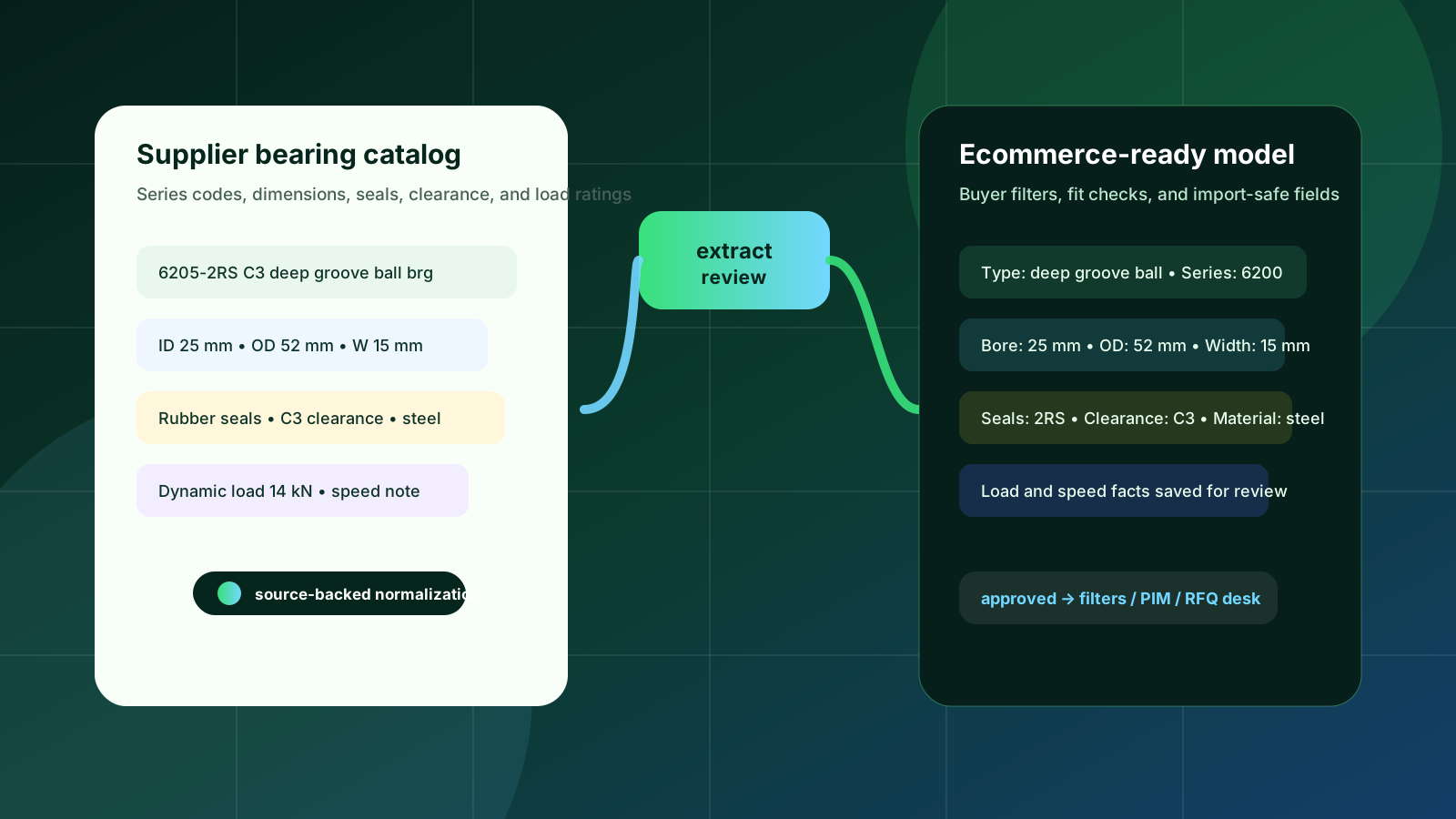
Bearings look simple in a search result until a buyer has to prove that one row is the right replacement for a motor, conveyor, pump, or gearbox. A part number such as 6205-2RS C3 may carry useful clues, but it is not enough for a modern B2B ecommerce experience. The buyer still needs bearing type, dimensions, seals or shields, clearance, material, load ratings, speed limits, manufacturer references, and sometimes cross-reference context before they can order with confidence.
That is why a bearing catalog should not be modeled as a flat description field plus a few dimensions. It needs an attribute model: a deliberate set of fields, units, rules, and review states that turns supplier catalogs into searchable, comparable, import-ready product data. This guide explains how distributors can build that model without over-engineering it.
Quick skim: the bearing model in five decisions
Start with bearing type and series before deciding filters. Ball, roller, needle, thrust, mounted, and spherical bearings do not all need the same buyer-facing fields.
Normalize geometry into canonical fields: bore, outside diameter, width, row count, and unit. Store the supplier value separately when it differs.
Treat suffixes as structured signals, not free text. Seals, shields, clearance, cage, tolerance, and lubrication often hide in suffix codes.
Separate search filters from review-only facts. Load ratings, speed limits, and application notes can be valuable, but they require source-backed review.
Keep a staging layer before Shopify, BigCommerce, Adobe Commerce, a PIM, or an ERP import so questionable fields do not go live by accident.
Why bearing attributes are different from ordinary product data
Many ecommerce catalogs can get by with color, size, material, and a short description. Bearing catalogs cannot. Buyers often search by part number first, but they also validate fit with dimensions, bearing type, seal arrangement, clearance, load capability, and manufacturer-specific suffixes. Two rows that look almost identical in a supplier spreadsheet can represent a meaningful difference in dust protection, internal clearance, cage material, or performance range.
Public bearing references from major manufacturers reinforce the same pattern: rolling bearings are selected around bearing type, dimensions, loads, speeds, operating conditions, arrangement, lubrication, and sealing. For distributors, the ecommerce task is not to turn all of that engineering context into a complicated selector on day one. The task is to capture the fields that buyers repeatedly need for discovery and trust, then protect the fields that require review.
A bearing attribute model should help a buyer answer two questions quickly: “Can I find the right family?” and “Can I trust this row enough to keep moving?”
1. Model the bearing family before the individual attributes
Do not begin by copying every supplier column into the storefront. Start with the product family. A practical distributor model usually begins with groups such as deep groove ball bearings, angular contact ball bearings, tapered roller bearings, spherical roller bearings, cylindrical roller bearings, needle bearings, thrust bearings, mounted units, and accessories.
Each family should have a small set of required attributes and a larger set of optional attributes. A deep groove ball bearing often needs bore, outside diameter, width, seal or shield configuration, clearance, row count, and material. A mounted bearing unit may need housing style, shaft size, locking method, bearing insert, housing material, and bolt-hole information. Trying to force both into the same field set creates empty columns and weak filters.
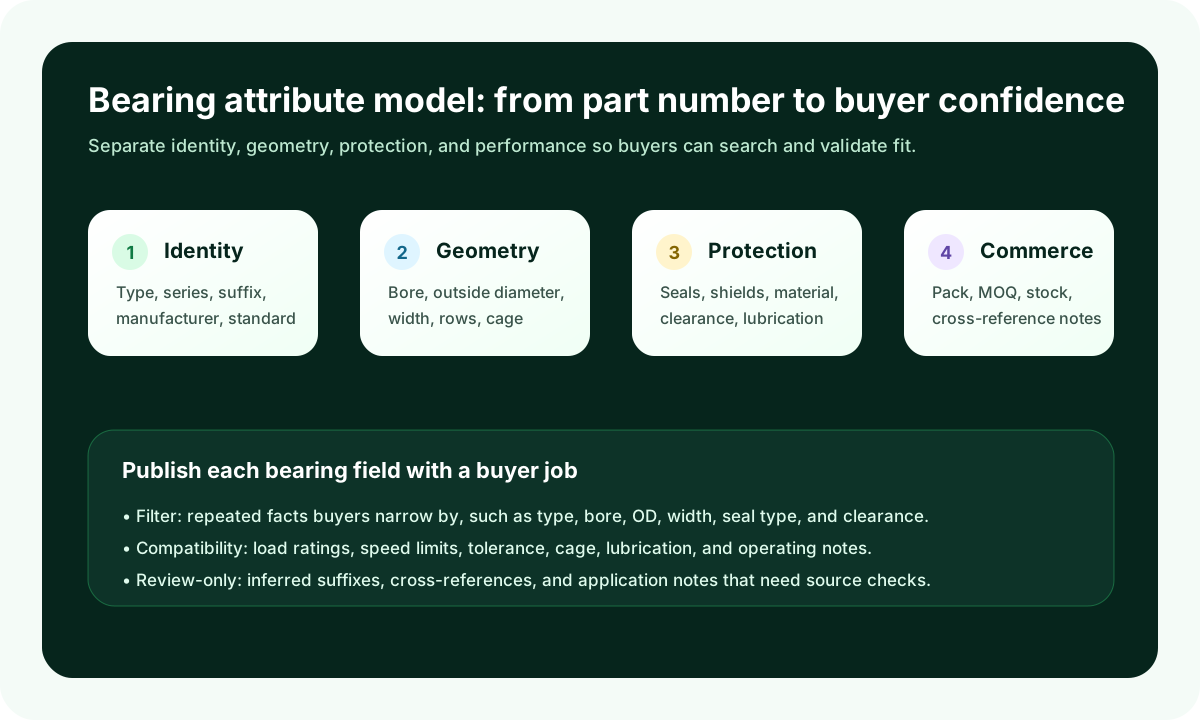
Required identity fields: product family, manufacturer, series, part number, normalized part number, and supplier source.
Required geometry fields: bore or shaft size, outside diameter or housing dimensions, width, and canonical unit.
Required commercial fields: pack quantity, minimum order quantity, stock status, and replacement or cross-reference notes where approved.
2. Normalize the dimensions buyers use to validate fit
Bearing dimensions should be stored as data, not buried in descriptions. Bore, outside diameter, and width are the core trio for many bearing types. They should use canonical names and units so a buyer can filter 25 mm bore bearings even if one supplier writes “25mm,” another writes “25 mm ID,” and a third lists inch equivalents.
For ecommerce, keep three versions when possible: the original supplier value, the normalized numeric value, and the display value. That gives the catalog team a source trail, gives the ecommerce platform clean filters, and gives sales or product specialists a way to resolve disputes when buyers ask why a row changed.
Good ecommerce fields
bore_diameter_value + unit
outside_diameter_value + unit
width_value + unit
row_count
dimension_source_reference
Risky shortcuts
one text field called “dimensions”
mixed inch and metric values in the same filter
supplier abbreviations without normalization
dimension changes with no source trail
3. Decode suffixes without pretending every inference is certain
Bearing suffixes are useful but easy to misuse. A suffix can indicate seals, shields, clearance, tolerance, cage material, lubrication, or special execution depending on manufacturer and product family. “2RS,” “ZZ,” “C3,” and similar labels may look universal, but exact meanings and combinations can vary enough that distributors should avoid blind rule-based publishing.
A better approach is to create structured suffix fields with confidence and review status. For example: seal_type = rubber contact seals, seal_count = two, clearance = C3, suffix_source = supplier catalog, review_status = approved. If a suffix is inferred from a part number rather than explicitly stated in a catalog table, mark it as inferred and route it for review before it becomes a buyer-facing filter.
Publish as filters when the suffix meaning is explicit and repeated across the category.
Publish as product-page facts when the detail matters but buyers rarely filter by it.
Keep as review-only when the field was inferred, conflicts across suppliers, or depends on manufacturer-specific rules.
4. Separate buyer filters from engineering context
Load ratings, speed limits, tolerances, lubrication notes, operating temperature, cage design, and material can be critical for some buyers. They can also create a messy storefront if they are all exposed as top-level filters. Decide which attributes support product discovery and which support validation after the buyer lands on a product page.
A common first-pass filter set for bearings might include product family, bore diameter, outside diameter, width, seal or shield type, clearance, manufacturer, and material. Product-page details can then include dynamic and static load ratings, limiting speed, cage type, lubrication, tolerance class, standards, and application notes. This keeps navigation usable while still giving technical buyers the facts they need.
5. Build the model around source-backed review
Bearing data usually arrives from PDFs, spreadsheets, manufacturer portals, ERP extracts, and legacy catalog pages. The same part may appear in several sources with slightly different wording. The attribute model should therefore include source references, extraction confidence, review status, and exception reasons. This is especially important when using AI or automation to parse catalogs.
Arovon fits this workflow upstream of ecommerce publishing: supplier documents become extracted rows, attributes are normalized, questionable values are flagged for review, and approved data can feed a PIM, ecommerce import, or quoting workflow. If your team is planning a catalog cleanup before a migration, start with a small pilot in request demo conversations or compare the workflow against your current spreadsheet process on the pricing page.
A practical pilot for a bearing category
A good pilot is not every bearing in the business. Choose one high-value family with enough volume to matter and enough source consistency to learn quickly. Deep groove ball bearings, mounted units, or a replacement-heavy product line can work well because buyers care about fit and the field set is understandable.
Collect two or three supplier sources and one ERP export for the same family.
Define the required fields, optional fields, and review-only fields before extraction begins.
Normalize units and part numbers in a staging table rather than directly in the storefront.
Ask sales or product specialists to review exception rows, not every clean row.
Export approved rows to a test collection or category and check whether filters match real buyer behavior.
What to measure before expanding the model
The right metrics are operational as much as commercial. Track how many rows were extracted, how many fields were normalized automatically, how many needed review, which attributes caused the most exceptions, and how long it took to approve a supplier file. On the ecommerce side, look at search refinements, zero-result searches, category exits, quote requests that still need manual product identification, and support questions about fit.
This gives management a practical business case. The goal is not “AI for bearings.” The goal is a repeatable product data workflow that reduces manual catalog cleanup, improves buyer confidence, and creates a safer path from supplier documents to ecommerce-ready product pages.
Final takeaway
A bearing attribute model should make the catalog easier to buy from and easier to maintain. Start with family-specific fields, normalize geometry carefully, decode suffixes with review, expose only useful filters, and keep source-backed approval in the workflow. If your bearing catalog is still managed through supplier PDFs and spreadsheets, contact Arovon to discuss a practical pilot for turning those sources into structured product data.