How to Create a Product Attribute Model for Fasteners
7/10/2026
A practical guide to modeling fastener attributes so bolts, screws, nuts, washers, and anchors become searchable, comparable, and ecommerce-ready.
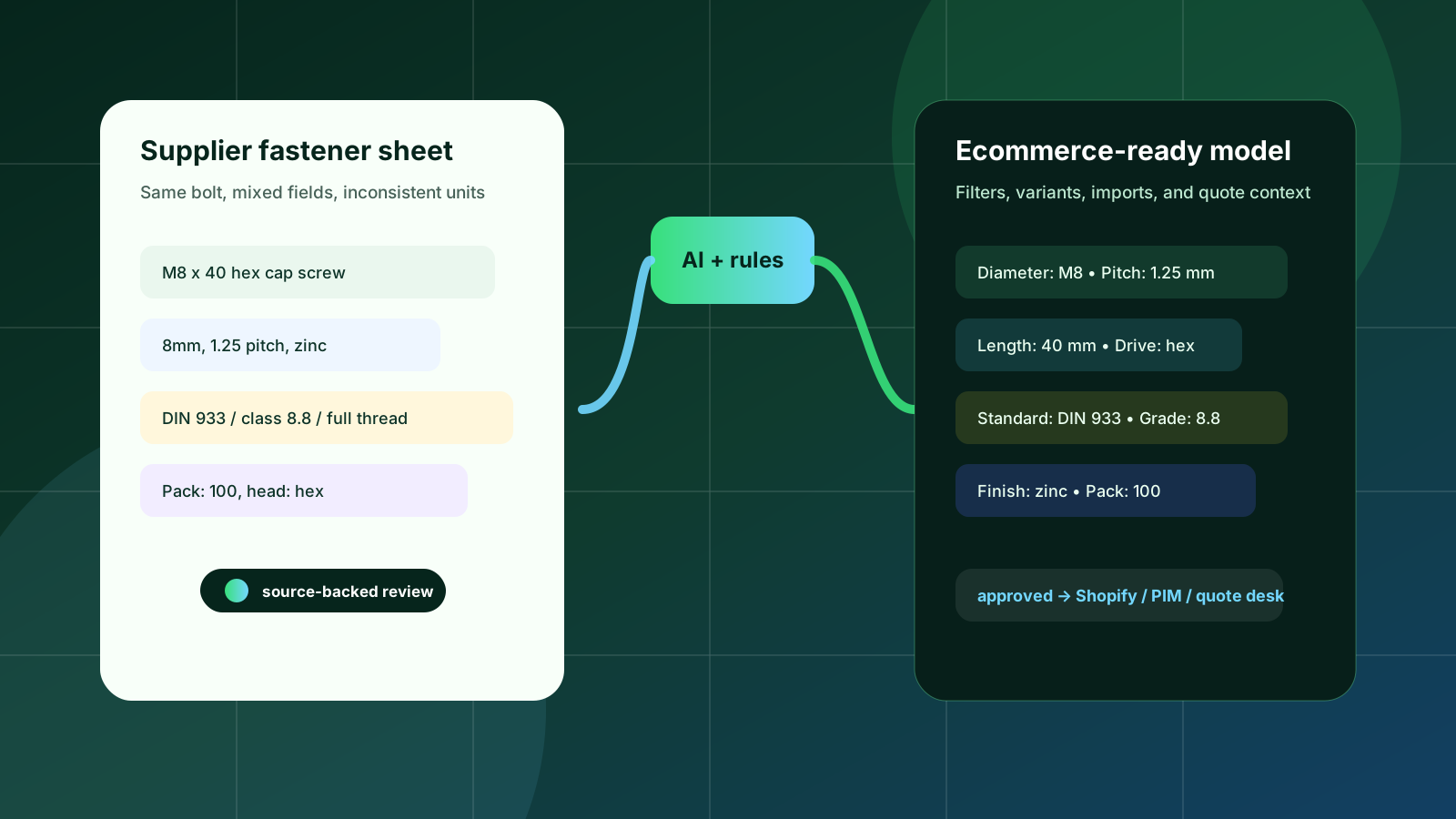
Fasteners look simple until you try to sell them online. A buyer may search for “M8 x 40 stainless socket head,” compare two grades, check whether the thread is full or partial, and still need pack size and standard references before adding anything to a cart or RFQ. If those facts live in supplier PDFs, free-text descriptions, or inconsistent ERP fields, search and filters quickly become unreliable.
A product attribute model is the bridge between source documents and a usable ecommerce catalog. For fasteners, the model should not be a random list of fields. It should define which facts identify the item, which facts help buyers narrow choices, which facts make variants safe, and which facts must remain source-backed for review.
Quick skim
Start with product family, drive/head/thread basics, dimensional attributes, material, finish, grade, standard, pack quantity, and source reference.
Do first
Model high-volume fastener families before edge cases. Normalize units and names before creating filters or variants.
Avoid
Do not publish supplier column names directly as filters. Do not group variants until diameter, length, pitch, and material are consistently captured.
Start with the buying job, not the supplier file
Supplier catalogs often describe fasteners in the order that makes sense to the supplier: series name, part number, material, finish, then a dense dimensional table. Ecommerce buyers work differently. They usually begin with fit and function: product type, diameter, length, thread, head style, drive style, material, grade, coating, or standard.
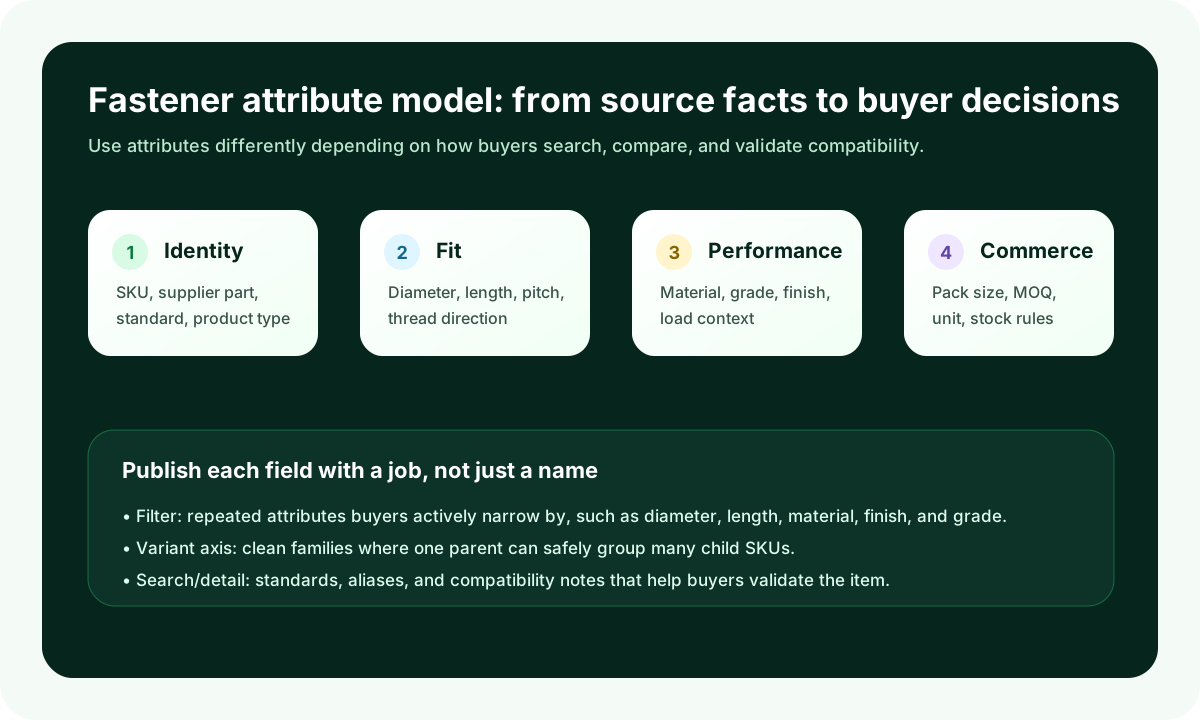
That means the first design decision is not “which columns exist?” It is “which buyer questions must the product page answer without a phone call?” A fastener distributor should normally model four attribute groups:
Identity attributes: SKU, supplier part number, manufacturer, product family, product type, and relevant standard such as ISO, DIN, ASTM, or ASME.
Fit attributes: diameter, length, thread pitch, thread type, thread direction, head style, drive style, point style, and washer/nut compatibility where relevant.
Performance attributes: material, grade/class, finish/coating, corrosion context, strength/load class, temperature or environment notes when supported by the source.
Commerce attributes: pack size, unit of measure, minimum order quantity, stock status, replacement/supersession notes, and whether a quote is required.
Build a canonical field set for each fastener family
One common mistake is to create one global fastener schema and force every bolt, screw, nut, washer, rivet, and anchor into it. That usually creates either missing fields or noisy filters. A better approach is a shared core plus family-specific extensions.
The shared core can include product type, standard, material, finish, grade, diameter/thread size, unit, pack quantity, supplier part number, source document, and review status. Then add family-specific fields: head and drive style for screws, thread engagement for nuts, inside/outside diameter for washers, grip range for rivets, anchor type and substrate for anchors.
This keeps search clean. A buyer looking at hex cap screws should not see irrelevant washer filters. A buyer comparing washers should not need to interpret screw head styles. The model can still export to Shopify, BigCommerce, Adobe Commerce, a PIM, or a staging table, but the source structure remains understandable to catalog teams.
Normalize dimensions before you create filters
Fastener dimensions are a filter-quality trap. Supplier documents may mix metric and imperial values, write “M8,” “8 mm,” and “8mm” differently, use fractions for inch sizes, or combine length and diameter inside one description. If those raw strings become filters, buyers see duplicate choices and miss relevant products.
A practical model stores both the source value and the canonical value. For example, diameter might keep the supplier value “M8” while also storing canonical thread size “M8,” nominal diameter “8,” unit “mm,” and system “metric.” Length can store source text “40mm” plus canonical numeric value 40 and canonical unit mm. That separation lets reviewers verify the extraction while ecommerce receives consistent filter values.
For fasteners, attribute quality is not about having more fields. It is about making the important fields consistent enough that buyers can safely narrow, compare, and reorder.
Decide what becomes a filter, a variant axis, or detail-only content
Not every attribute deserves the same treatment. Over-filtering makes categories feel complex; under-filtering forces buyers back to sales. Use the attribute’s buyer value and repeatability to decide its job.
Attribute job | Good fastener examples | Rule of thumb |
|---|---|---|
Filter | Diameter, length, material, finish, head style, drive style, grade | Use when buyers actively narrow results and values repeat across many SKUs. |
Variant axis | Length within the same diameter/material family; finish where SKUs are otherwise equivalent | Use only when parent-child grouping is clean and does not hide important differences. |
Search/detail field | Standard references, aliases, compatibility notes, source notes | Use when the fact helps validation but would clutter filters. |
Review-only field | Ambiguous supplier notes, conflicting dimensions, extracted table footnotes | Keep internal until a reviewer approves the normalized value. |
Variant modeling deserves special caution. A family of socket head cap screws may look like a simple diameter-by-length matrix, but material, finish, thread pitch, standard, and pack quantity can change across rows. If those differences are hidden under one parent product, buyers may select the wrong item. Treat variant grouping as a governance decision, not just a merchandising preference.
Keep source references and review status in the model
Fastener specs are technical. Catalog teams, sales teams, and buyers need confidence that values came from a supplier document, not from an unsupported rewrite. A source-backed attribute model should retain the source file, page/table reference where available, original text, normalized value, and review status.
This is where product data automation becomes useful without becoming reckless. Arovon can help extract fastener rows from supplier PDFs and spreadsheets, normalize fields, flag exceptions, and prepare ecommerce-ready exports. But technical attributes still benefit from a review workflow, especially when source documents conflict or omit critical context.
A practical rollout plan
If your fastener catalog is large, do not try to model everything at once. Pick one family with meaningful traffic or quoting volume, then build a reusable pattern.
Choose one family, such as hex bolts, socket screws, washers, or nuts, and collect representative supplier PDFs, spreadsheets, and ERP exports.
List the buyer questions that must be answered for that family: fit, strength, corrosion, standard, pack quantity, and reorder identifiers.
Create the shared core fields and family-specific fields, including source value, normalized value, unit, display value, and review status.
Test the model on 100–300 SKUs before publishing filters. Check whether buyers would see clean values, useful variants, and trustworthy product pages.
Export to a staging table before sending the data to ecommerce. Fix exceptions before they become public catalog problems.
Once the first family works, extend the same pattern to nearby families. The goal is not a perfect data model on day one. The goal is a repeatable workflow where each new supplier document improves the catalog instead of creating another cleanup project.
Where Arovon fits
Fastener distributors usually have the product knowledge already. The bottleneck is turning supplier documents into structured, reviewed, ecommerce-ready data without months of manual copy-paste work. Arovon is built for that middle layer: supplier files in, extracted product rows and attributes out, with review steps before export.
If you are planning a fastener catalog cleanup, a Shopify or BigCommerce import, or a PIM implementation, start by defining the attribute model that buyers and internal teams can trust. Then automate around that model. For a practical walkthrough, request a demo, review pricing, or contact Arovon with a sample supplier catalog.