How to Create a Product Attribute Model for Springs
7/13/2026
A practical spring catalog data model for distributors: which dimensions, load facts, materials, end styles, and commerce fields should become searchable ecommerce attributes.
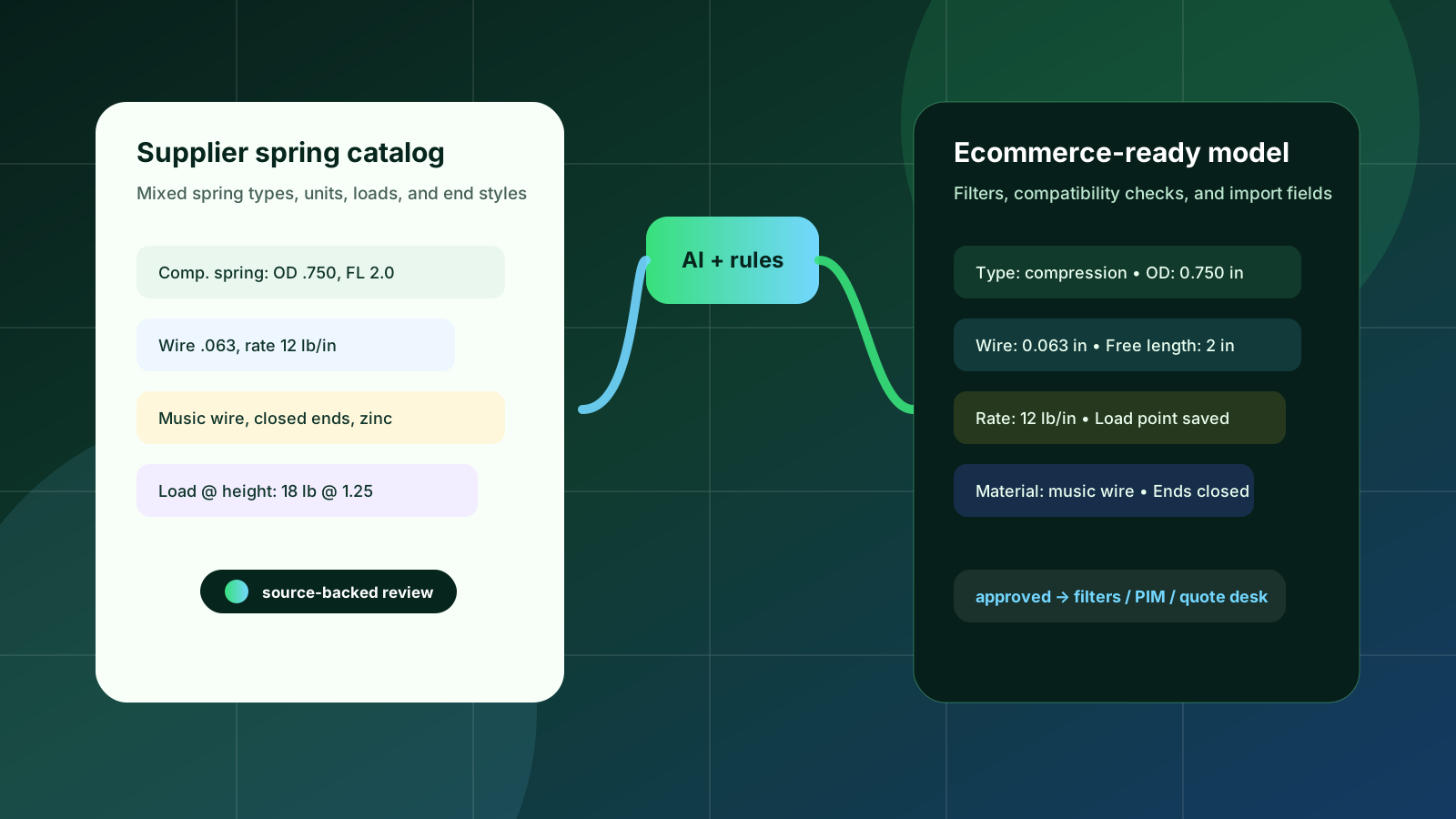
Springs look simple in a catalog until a buyer tries to find the exact part that fits a load, travel, package size, and installation constraint. One supplier may describe a compression spring by outside diameter and free length. Another may lead with wire diameter, rate, load at height, end type, or material. Extension and torsion springs add hooks, loops, legs, angle, direction, and torque data. If those facts stay trapped in PDFs or inconsistent spreadsheets, ecommerce search becomes guesswork.
A useful product attribute model turns that messy supplier language into buyer-facing fields. It does not need to be academically perfect on day one. It needs to help catalog managers decide what should become a filter, what belongs on the product detail page, what needs engineering review, and what must be preserved for ERP, PIM, Shopify, BigCommerce, Adobe Commerce, or the quote desk.
Quick skim
Start by separating compression, extension, torsion, die, and specialty springs before defining attributes.
Store source values and normalized values separately so reviewers can trace every ecommerce fact back to the catalog.
Use geometry for discovery, performance data for compatibility, and commerce fields for buying rules.
Do not publish calculated or ambiguous load facts without a review status and source reference.
Best first pilot
Pick one spring type and one supplier family with repeatable layouts.
Normalize units for diameter, length, force, and rate before building filters.
Compare buyer search terms with quote history to choose the first filters.
Export a staging table before pushing anything into a live storefront.
Start with spring type, not a universal field list
A common mistake is to create one broad “spring attributes” spreadsheet and force every SKU into it. That produces too many blank fields and hides the attributes that matter for each family. Compression springs need outside diameter, inside diameter, wire diameter, free length, solid height, spring rate, and load points. Extension springs need length, hook or loop style, initial tension, maximum extension, and end orientation. Torsion springs need leg length, angle, mandrel or inside diameter, direction of wind, and torque characteristics.
The model should therefore begin with a product type field that drives the rest of the schema. For ecommerce, this lets category pages show the filters buyers actually use. For operations, it lets extraction and review workflows validate against the right required fields instead of treating every blank cell as an error.
The core spring attribute groups
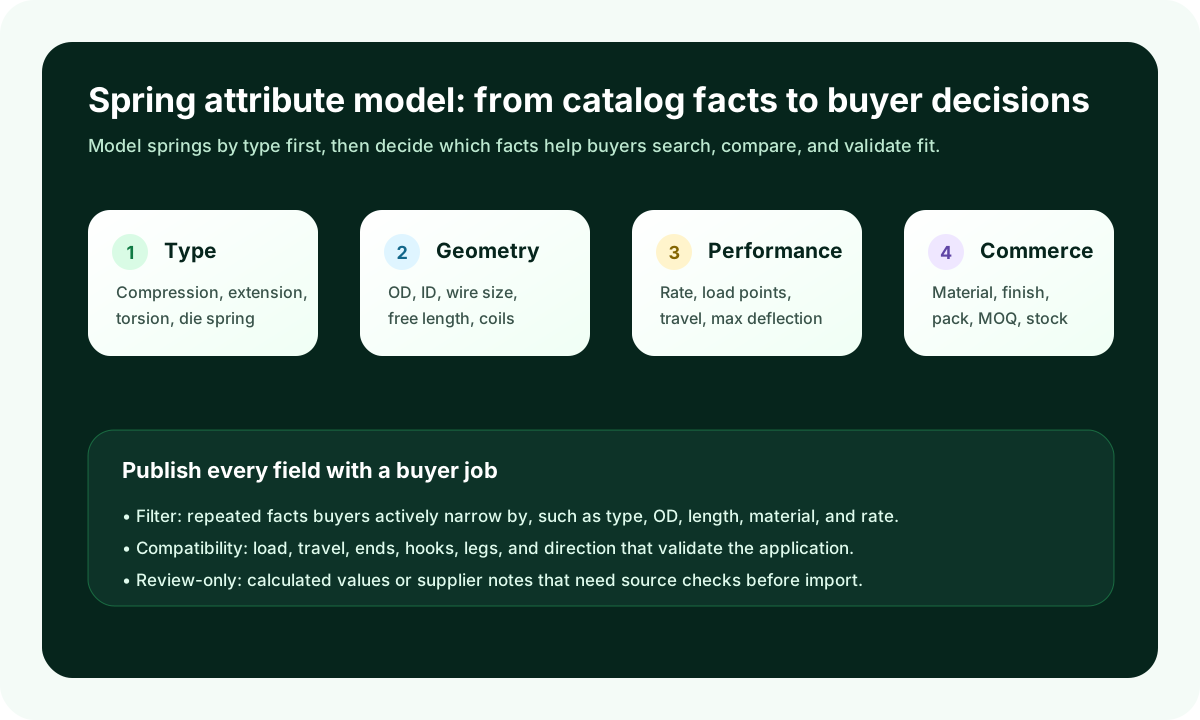
For most industrial distributors, the spring model can be organized into five groups. The group names matter because they make the model easier to explain to sales, catalog, and ecommerce teams.
Identity: SKU, supplier part number, manufacturer, spring type, series, standard or catalog family, and any replacement or cross-reference identifiers.
Geometry: outside diameter, inside diameter, wire diameter, free length, body length, total length, number of coils, leg length, hook style, and end configuration.
Performance: spring rate, load at specified height, deflection, working travel, maximum load, solid height, torque, angle, and cycle-life notes when the supplier provides them.
Material and finish: music wire, stainless steel, phosphor bronze, oil-tempered wire, zinc, passivation, coating, temperature notes, and corrosion context.
Commerce fields: pack quantity, unit of measure, MOQ, lead time, stock status, account-specific availability, and whether the item is buy-now or request-quote.
Decide which attributes become filters
A filter is not simply an attribute that exists in the data. It is an attribute buyers repeatedly use to narrow a list. For compression springs, outside diameter, free length, wire diameter, material, rate, and load range are often strong filter candidates. For extension springs, hook type and extended length may matter more. For torsion springs, direction of wind, leg angle, and torque range can be essential.
Avoid publishing every supplier column as a filter. Too many filters create a storefront that looks technical but does not help selection. A good rule is to make a field a filter only when it is normalized, populated across enough SKUs, and used by buyers to make a decision. Everything else can still appear on the product detail page or stay in review until the dataset is stronger.
The goal is not to turn every supplier note into a storefront filter. The goal is to make the buyer’s selection path shorter and safer.
Preserve source values beside normalized values
Spring data is full of unit and terminology variation: inches and millimeters, pounds and newtons, rate per inch and rate per millimeter, free length and uncompressed length, OD and outside diameter. Normalization is necessary, but the original source value should not disappear. Catalog reviewers need to see the supplier’s wording when they validate an extracted row or resolve a conflict.
A practical staging table stores source_value, source_unit, normalized_value, normalized_unit, display_value, source_reference, confidence, and review_status. That structure supports automation without pretending the automation is always right. It also gives sales and support teams a clear path when a customer asks where a specification came from.
Do
Normalize diameter, length, rate, load, and torque into canonical units.
Keep supplier page, table, or file references attached to each extracted fact.
Flag conflicting load/rate values for review instead of choosing silently.
Use display values that match how buyers expect to read the category.
Avoid
Combining spring types before required fields are defined.
Converting units without preserving the supplier value.
Using calculated values as published facts without a review note.
Letting ERP item descriptions become the only searchable product text.
Connect the model to ecommerce and quoting workflows
The same attribute model should serve multiple outputs. Ecommerce pages need clean filters, product titles, detail tables, and SEO-friendly descriptions. PIM systems need governed fields and channel mappings. ERP usually remains the source for price, inventory, and order rules. Quote teams need enough source-backed data to confirm suitability before responding.
That is why the model should include an export_status or channel_readiness field. A row can be extracted, normalized, reviewed, approved for internal quoting, and later approved for storefront publishing. This avoids the all-or-nothing trap where catalog teams wait for perfection before making any progress.
A simple spring-model scorecard
Question | Why it matters | Good answer |
|---|---|---|
Can buyers filter by the attributes they actually compare? | Search and category pages depend on normalized, populated fields. | The top spring type has 5-8 reliable filters with strong coverage. |
Can reviewers trace each specification to a source? | Spring load and rate facts can be safety- or fit-sensitive. | Every key spec has source reference, confidence, and review status. |
Can the model support multiple storefronts or a PIM? | Distributors rarely use one channel forever. | Fields are canonical, not named only for one import template. |
Can sales use the data during RFQs? | Not every spring should be buy-now. | Quote-ready rows include performance facts, notes, and exceptions. |
Where Arovon fits
Arovon helps distributors turn supplier PDFs, spreadsheets, and catalog files into reviewed product data that can feed ecommerce, PIM, and quote workflows. For spring catalogs, that means extracting dimensions and performance facts, normalizing units, preserving source references, and giving the team a structured review process before export.
If your spring catalog work is still handled through manual copy-paste, inconsistent supplier spreadsheets, or one-off import cleanup, start with a focused pilot. Choose one spring family, define the required fields, review the first extracted rows with sales or product specialists, and then export to a staging table before publishing.
To discuss a practical pilot for your catalog, request a demo, review pricing, or contact Arovon with the supplier files you want to automate first.