How to Build a Product Data Staging Table Before Importing to Ecommerce
7/30/2026
A practical guide for distributors that need a safe staging layer between supplier files, ERP exports, and ecommerce imports.
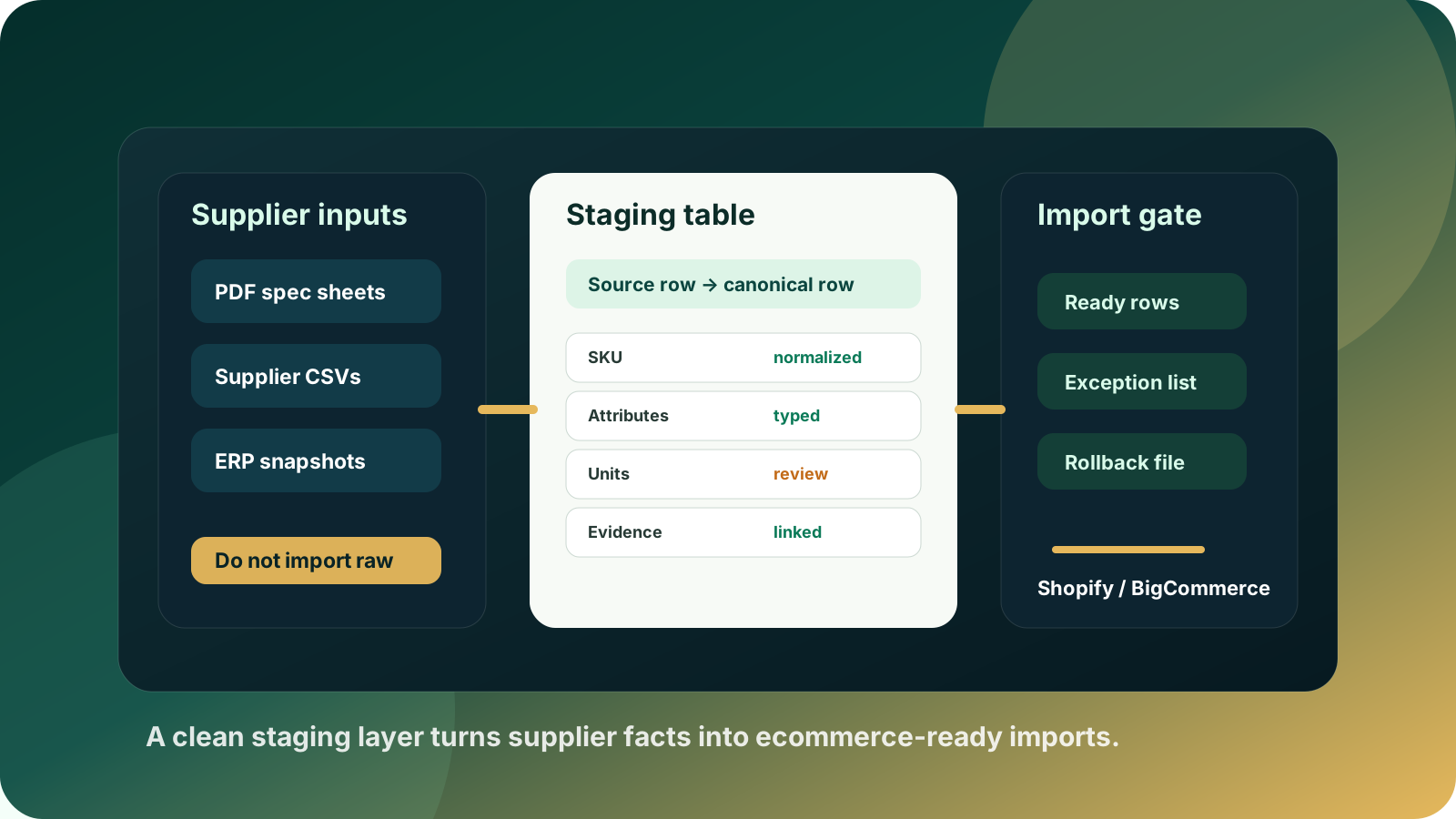
Most ecommerce import problems are not caused by the final import button. They start earlier, when supplier PDFs, spreadsheets, ERP exports, and manual edits are treated as if they are already ready for Shopify, BigCommerce, Adobe Commerce, a PIM, or a custom B2B storefront.
For industrial distributors, that shortcut is risky. A supplier file may contain useful facts, but it also contains inconsistent units, product family assumptions, missing attributes, duplicate part numbers, legacy naming conventions, and values that only make sense inside the supplier's own catalog structure. If those rows go straight into ecommerce, the web team inherits a cleanup problem in the worst possible place: inside a live catalog.
A product data staging table gives you a safer middle layer. It is not just another spreadsheet. It is a controlled workspace where raw supplier facts become normalized, reviewed, channel-ready product rows before anything reaches the ecommerce platform.
Quick skim: what the staging table should do
Protect the ecommerce platform from raw supplier data, duplicate SKUs, broken variants, and inconsistent units.
Keep source evidence next to each normalized attribute so reviewers can check uncertain values quickly.
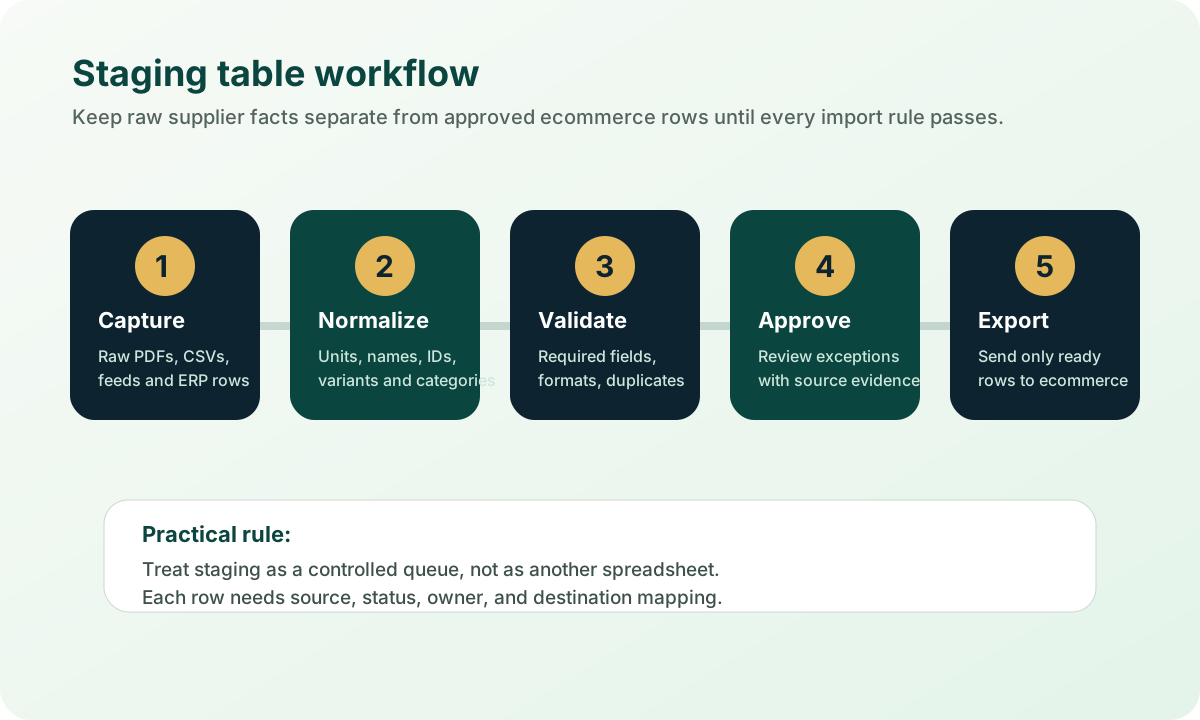
Separate extraction, normalization, validation, approval, and export instead of mixing all work in one import file.
Create an exception queue for missing, conflicting, or high-risk fields instead of forcing every row through the same path.
Make future supplier updates easier because the mapping rules live upstream from Shopify, BigCommerce, Adobe Commerce, PIM, or ERP import templates.
Why raw supplier files should not become import files
Supplier documents are optimized for the supplier's sales process, not for your buyer experience. A PDF catalog can be perfectly useful for a human sales rep and still be a poor source for ecommerce. It may combine dimensions in one description, use abbreviations without definitions, bury compatibility notes in footers, or rely on images and tables that need interpretation.
Spreadsheets are not automatically cleaner. They often contain merged commercial and technical fields, inconsistent units, blank required values, duplicate manufacturer part numbers, or columns that only apply to some product families. ERP exports add another complication: ERP data is often excellent for price, stock, tax, and order handling, but thin for buyer-facing filters, product descriptions, source documents, and variant logic.
The staging table is the place where supplier facts become accountable product data. Until a row has a source, a normalized value, a review status, and an export destination, it is not ready for ecommerce.
This matters because B2B buyers increasingly expect self-service product discovery, while ecommerce platforms still enforce strict catalog rules. Adobe Commerce import documentation distinguishes add/update, replace, and delete operations and validates required values and CSV formatting. Platform import tools are useful, but they are not a substitute for upstream data governance. The safest approach is to fix the product-data layer before the platform sees the file.
The minimum fields every staging row needs
A useful staging table does not need to be over-engineered on day one. Start with fields that make each row traceable, reviewable, and exportable. The goal is to answer four questions: where did this value come from, what should it become, who reviewed it, and where will it go?
Source evidence: supplier file, page, sheet, row ID, timestamp, and original value so reviewers can check uncertain fields quickly.
Canonical product identity: internal SKU, supplier part number, manufacturer part number, product family, and variant group.
Normalized attributes: attribute name, data type, canonical unit, display value, and confidence or review status.
Validation state: required-field checks, duplicate checks, unit checks, category checks, and exception reason.
Export mapping: destination platform, destination field, import batch, owner, and rollback reference.
Design the staging table around status, not just columns
The most important column in a staging workflow is often the status column. Without status, every row looks equally ready, even when some values are extracted, some are guessed, and others have been checked against source documents. Status also helps operations leaders see whether a catalog project is blocked by extraction, normalization, review capacity, or platform mapping.
Raw: captured from supplier, ERP, PDF, CSV, or an existing catalog export.
Mapped: connected to an internal product family, attribute model, and destination field.
Needs review: missing value, conflict, low confidence, unit ambiguity, or duplicate identity risk.
Approved: checked against source evidence and ready for a controlled export batch.
Exported: sent to ecommerce, PIM, ERP staging, or another downstream system with a batch reference.
This approach reduces the pressure to make every row perfect immediately. High-confidence rows can move forward, while exceptions become visible work rather than hidden defects.
How to validate before the ecommerce import
Validation should happen before the import template is built. If validation happens only inside the ecommerce platform, your team ends up fixing errors one failed upload at a time. A staging layer lets you run category-specific rules in bulk and reserve human review for the rows that actually need judgment.
Identity checks: no duplicate SKU, no duplicate manufacturer part number in the wrong context, and no accidental overwrite of an existing product.
Required field checks: title, product family, category, price/availability handoff, images or documents where required, and all mandatory platform fields.
Attribute checks: correct data type, canonical unit, allowed values, source-backed dimensions, and consistent naming across the product family.
Variant checks: parent-child grouping, option names, option values, and rules for simple versus configurable products.
Channel checks: destination-specific field length, taxonomy, metafields, custom fields, URL handles, tags, and import format.
Staging table versus spreadsheet: the practical difference
A spreadsheet can be a temporary interface, but it should not be the system of record for a scaling product-data workflow. The difference is control. A spreadsheet usually hides lineage, permissions, validation rules, and export history. A staging table makes those controls explicit.
Spreadsheet-first workflow
Rows are copied from supplier files into import templates.
Review notes live in comments, emails, or separate tabs.
Errors are discovered during import or after publishing.
Rules are hard to reuse on the next supplier update.
Staging-table workflow
Raw values and canonical values are stored separately.
Each exception has a reason, owner, and source reference.
Validation happens before export.
Mapping and cleanup rules can be reused for future updates.
Where Arovon fits
Arovon is built for the messy step before ecommerce import: turning supplier PDFs, spreadsheets, and catalog files into structured product data that can be reviewed and exported. Instead of treating AI extraction as a finished record, Arovon helps teams create a review-first workflow where source-backed rows can be approved, corrected, or held back before publication.
For a distributor preparing a Shopify, BigCommerce, Adobe Commerce, PIM, or custom catalog import, that means the staging layer can become the working bridge between supplier material and platform-specific import files. The value is not only faster cleanup. It is fewer bad rows reaching buyers, sales reps, and downstream systems.
A simple pilot plan
Start with one product family rather than the entire catalog. Choose a family with enough SKUs to matter, enough repeated attributes to reuse, and enough current pain to justify the work. Then build the staging table around a real import goal, not a theoretical data model.
Pick one product family and define the destination platform or import format.
Collect the supplier PDFs, spreadsheets, ERP exports, and current product-page examples.
Create the staging fields for source evidence, identity, normalized attributes, status, and export mapping.
Run extraction and normalization, then route only exceptions to reviewers.
Export a small approved batch, verify the ecommerce result, and document the rules that should be reused.
If your team is preparing for a relaunch, PIM cleanup, supplier onboarding project, or ecommerce catalog expansion, Arovon can help you build the staging workflow before bad data reaches the storefront. Request a demo or review pricing to see whether a focused product-data automation pilot makes sense for your catalog.