How to Turn Supplier Catalogs Into Searchable Ecommerce Categories
6/26/2026
Supplier catalogs rarely map cleanly to the way B2B buyers search. Here is a practical workflow for turning PDFs and spreadsheets into ecommerce categories, filters, and review-ready product data.
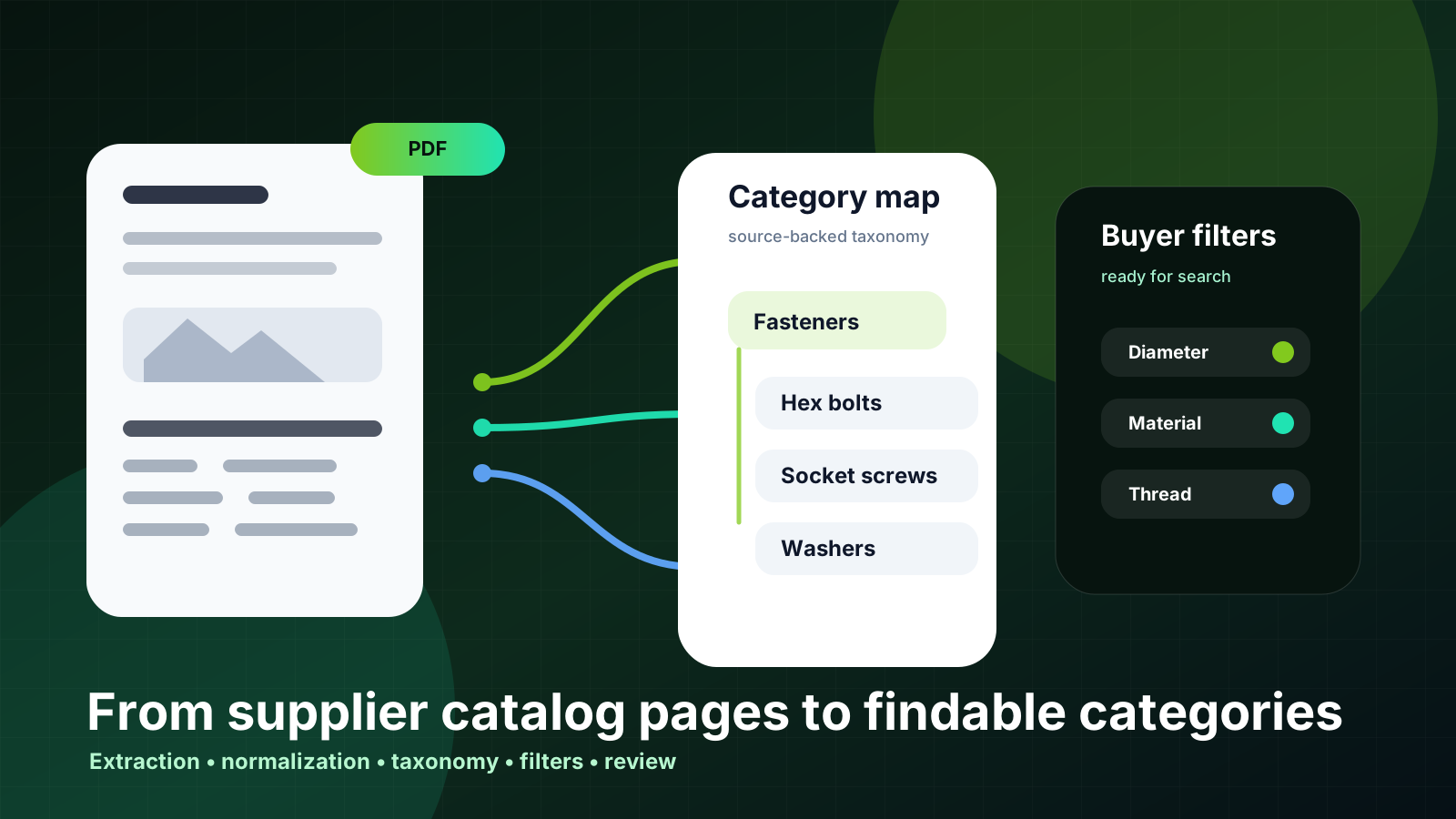
A supplier catalog usually reflects how the supplier prints, sells, or manufactures its range. Your ecommerce site needs something different: categories that help buyers find the right product quickly, compare alternatives confidently, and trust that the specs are backed by source material.
That gap is why catalog imports so often stall before launch. A PDF may have logical sections, table headings, and part-number families, but those sections rarely become clean web categories without interpretation. A fastener chapter might contain bolts, washers, kits, finish variants, and accessories. A pump catalog might mix application notes, replacement parts, curves, and spare assemblies. If you copy that structure directly, buyers get a digital version of the paper catalog rather than a searchable purchasing experience.
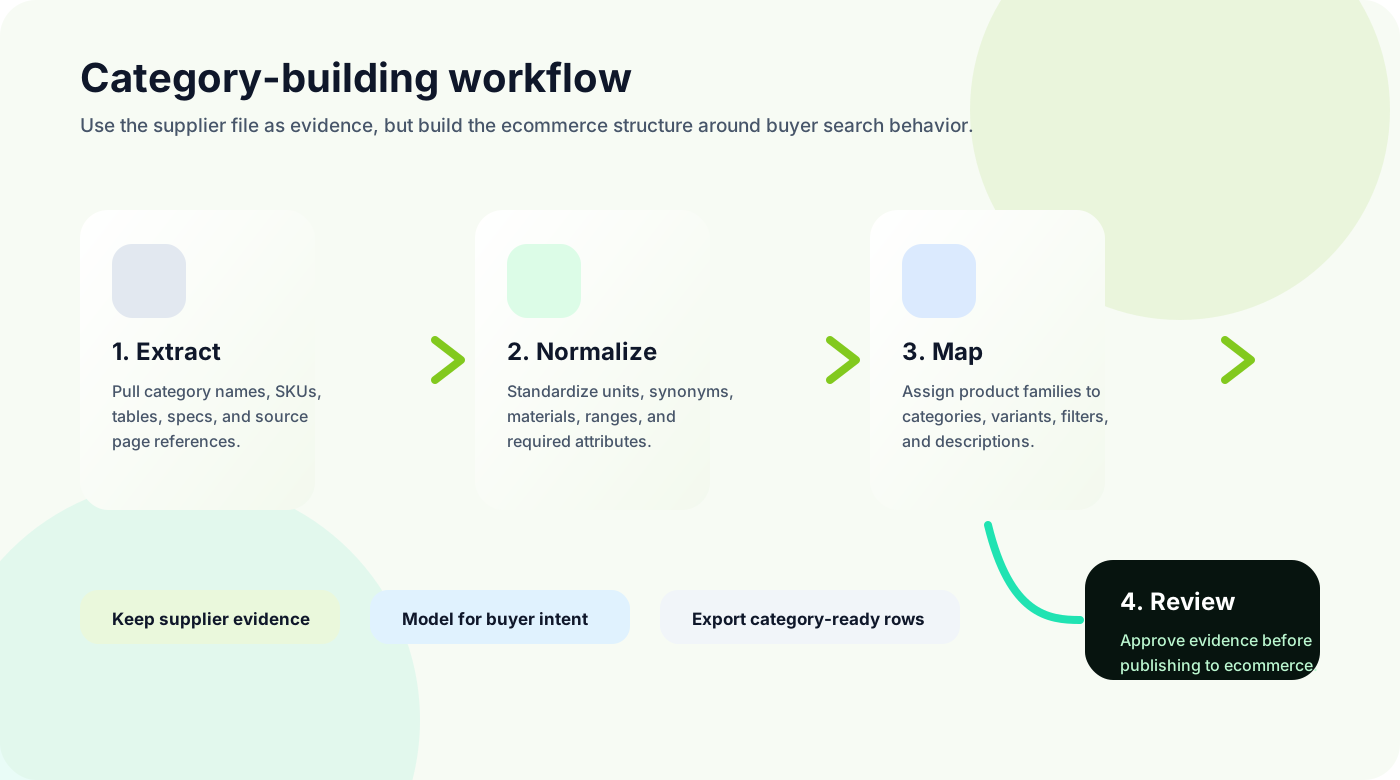
The better approach is to treat supplier catalogs as evidence, not as the final category model. Extract what the supplier provides, normalize the attributes, then map product families into a taxonomy that matches buyer intent. Done well, this work improves site search, filters, quoting, and future AI-assisted discovery.
Quick skim
Use supplier sections as source clues, but design categories around how buyers search, compare, and reorder.
Main risk
Copying a PDF table of contents creates messy categories, duplicate families, and filters that only work for one supplier.
Best next step
Start with one high-value product family, define required attributes, and review category assignments before import.
Start with buyer questions, not the supplier table of contents
In B2B ecommerce, categories are more than navigation labels. They are the first layer of product discovery. A buyer may arrive with a part number, a generic product name, a standard, a size range, a material, an application, or a problem to solve. The category model has to support all of those paths without turning the site into a maze.
Current B2B commerce guidance keeps returning to the same theme: business buyers expect easy product search, clear specifications, self-service options for routine purchases, and consistent product data across channels. For distributors, that means the category structure cannot be an afterthought handled at the final CSV import stage. It has to be part of the product-data workflow.
Before importing a supplier catalog, ask a few practical questions:
Would a buyer search for this product family by category name, application, dimension, standard, material, or brand?
Which attributes should become filters because they narrow a real purchasing decision?
Which differences are variants of the same product and which deserve separate category pages?
Which supplier headings are internal or print-oriented and should not appear in the ecommerce navigation?
What source evidence is needed before a catalog manager or sales team will approve the mapping?
Extract the catalog structure, then separate labels from decisions
A useful extraction pass should capture more than SKUs and descriptions. It should also pull section headings, table headings, family names, product names, units, notes, and page references. These elements tell you how the supplier groups its products and what evidence exists for each row.
But extraction is not the same as categorization. A supplier may use inconsistent headings across PDFs, translate names differently by region, or place related items in separate chapters because of print layout constraints. Treat each extracted label as a candidate, then decide whether it should become a category, synonym, tag, filter value, product type, or internal note.
Build a category model that can survive multiple suppliers
The first catalog is often misleading because it looks complete in isolation. Problems appear when the second and third supplier use different names for the same family, different units for the same attribute, or different levels of detail. If you let each supplier create its own ecommerce categories, the storefront becomes fragmented: Hex bolts, hexagon bolts, DIN bolts, and metric bolts may all compete for the same buyer journey.
A more durable model separates canonical categories from supplier language. The canonical category is the buyer-facing destination. Supplier terms become synonyms, search terms, or source labels. Attribute values are normalized so that filters work across suppliers. For example, thread type, diameter, material, finish, length, and standard may need controlled values even when the supplier table uses mixed abbreviations.
The category model should make the buyer feel like your site understands the product family, not like it imported a supplier PDF and hoped search would fix the rest.
Decide what becomes a category, filter, variant, or description
Many catalog problems are really classification problems. Teams try to solve them with longer product descriptions when the data actually needs a clearer role. A term that belongs in a filter should not be buried in prose. A true variant should not become a separate standalone product if buyers expect to compare sizes on one page. A note about an application may belong in the description, but a compliance standard may need a structured field.
Good ecommerce categories
Represent a product family buyers recognize
Can contain enough products to be useful
Support consistent required attributes
Work across more than one supplier
Create clear landing pages for search and navigation
Weak category signals
Supplier-only chapter names
Temporary campaign or brochure labels
One-off materials that should be filters
Sizes that should be variants
Internal ERP groupings buyers would not use
This decision is easier when every product family has an attribute model. The model defines required fields, optional fields, units, synonyms, and review rules. For a fastener category, that might include diameter, length, thread pitch, head type, material, finish, grade, and standard. For replacement parts, it might include compatible equipment, part family, manufacturer code, and lifecycle status.
Use review queues before publishing category assignments
Category mistakes are expensive because they spread through navigation, search, feeds, internal links, and buyer expectations. A review workflow catches the issues that automated extraction cannot safely decide alone: ambiguous product families, mixed table headings, missing attributes, inconsistent units, and category assignments that sales teams know will confuse buyers.
The review should not be a vague check-the-import task. Give reviewers the source snippet, extracted row, proposed category, proposed filters, confidence flags, and the reason a field needs attention. That lets catalog managers and product specialists approve decisions quickly instead of opening the original PDF for every row.
This is where Arovon fits naturally. Arovon helps distributor teams move from supplier PDFs and spreadsheets to structured, review-ready product data. The goal is not blind automation. The goal is faster extraction, normalization, evidence-backed review, and cleaner export into the ecommerce, PIM, or ERP-connected workflow you already use. If your team is preparing a catalog migration, start with the product data automation workflow and connect it to your pricing or demo conversation when you are ready to test a real supplier file.
A practical pilot plan
Do not start by trying to categorize the whole supplier universe. Pick one high-value product family where ecommerce search currently fails or where sales spends too much time answering routine product-identification questions. Then run a focused pilot:
Collect two or three supplier catalogs for the same product family.
Extract headings, product rows, attributes, units, notes, images, and source references.
Define the canonical category tree and the required attributes for each category.
Map supplier terms to canonical categories, synonyms, filters, and variants.
Review exceptions with sales or catalog specialists before exporting.
Measure search improvements, filter coverage, manual correction time, and import readiness.
The output of that pilot should be more than a spreadsheet. It should be a repeatable rule set for how your team turns supplier language into buyer-facing ecommerce structure. Once that pattern works for one family, it becomes much easier to extend to more categories without rebuilding the logic every time.
The takeaway
Searchable ecommerce categories do not appear automatically because a supplier sent a detailed catalog. They come from a disciplined product-data workflow: extract source evidence, normalize attributes, separate supplier labels from buyer-facing categories, review uncertain mappings, and export data that your ecommerce platform can actually use.
For industrial distributors, this work is the bridge between having product information somewhere and helping buyers find, compare, quote, and order products without calling for every routine question. If your supplier catalogs are still trapped in PDFs, spreadsheets, and inconsistent category names, contact Arovon to discuss a focused product-data pilot.