Why Product Variants Are So Hard for Industrial Distributors
7/7/2026
Industrial variants are difficult because supplier rows, buyer choices, ERP rules, and ecommerce filters do not map cleanly. Here is a practical decision model for distributors.
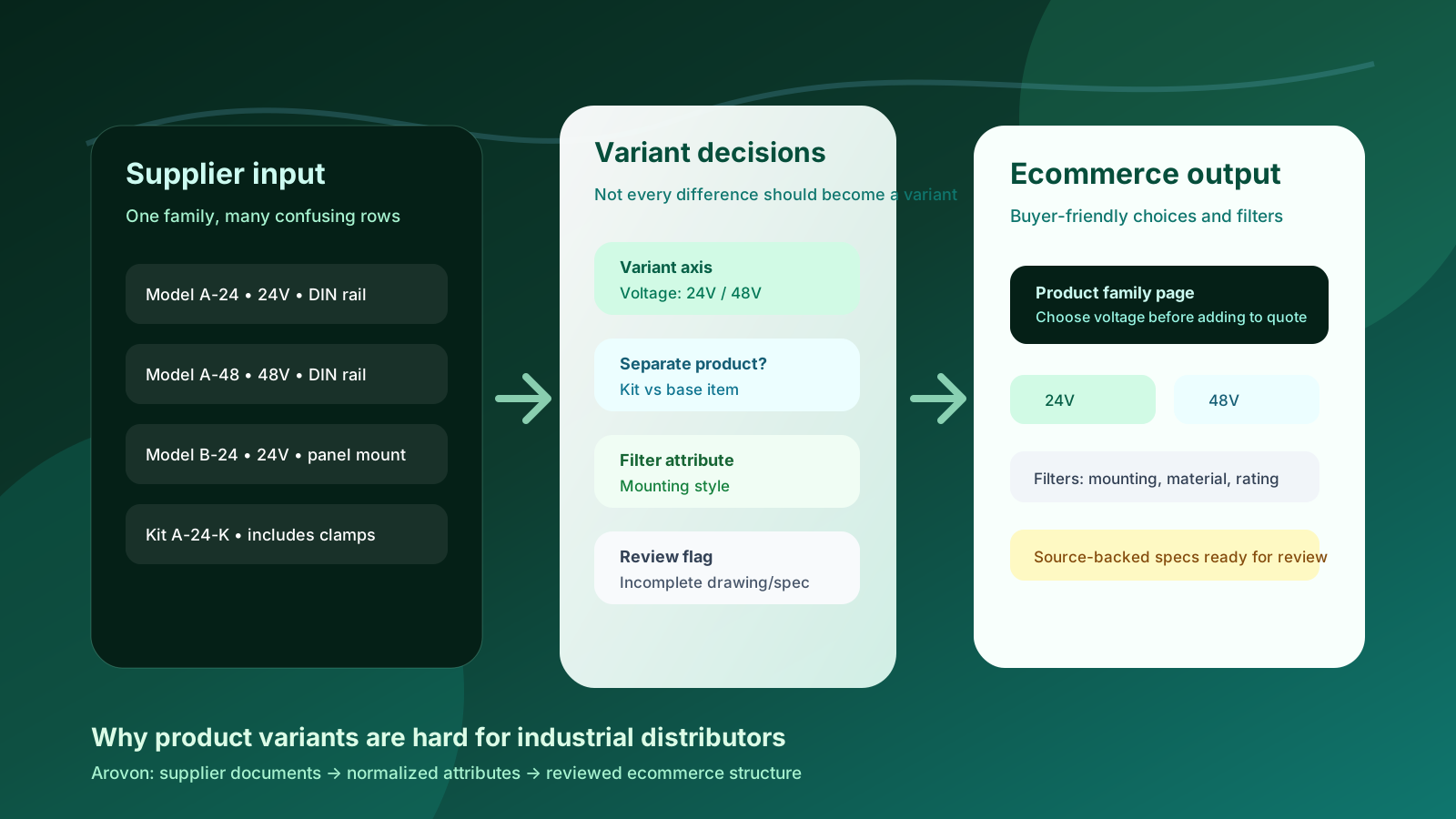
Industrial distributors often discover variant problems late: during a website relaunch, a PIM import, a supplier update, or a painful ecommerce search review. A supplier catalog may list hundreds of near-identical rows, but the web store needs a clear product family, buyer-friendly options, clean filters, and reliable SKU-level facts. That translation is where variants become difficult.
A 24V and 48V version might be a simple choice inside one product family. A kit version may need its own product page. A different coating could be a filter, a variant axis, or just a description detail depending on how customers buy. When those decisions are made row by row without a model, industrial ecommerce becomes hard to search, hard to maintain, and risky for sales teams to trust.
This guide explains why variants are difficult in industrial catalogs and how distributors can build a practical, reviewable structure before pushing data into Shopify, BigCommerce, Adobe Commerce, a PIM, or an ERP-connected storefront.
Quick skim
Variants are buyer choices inside a product family, not just duplicate supplier rows.
Industrial attributes often affect discovery, quoting, fulfilment, compliance, and replacement decisions at the same time.
The safest workflow keeps source values, normalized values, and review decisions separate until the catalog team approves them.
Best first step
Pick one product family and classify every difference as a variant axis, filter attribute, separate product, accessory, or review exception. Then test whether a buyer can find and compare the items without calling sales for basic clarification.
Industrial variants are not the same as consumer variants
Consumer ecommerce often treats variants as familiar choices: size, color, material, or pack count. Industrial buying is more constrained. A small difference can change compatibility, safety, replacement fit, lead time, freight, contract price, or whether the item should be quoted rather than bought directly.
That is why “just group similar SKUs” is not a reliable strategy. Two rows that look similar in a spreadsheet may represent different order rules. Two rows that look different may be the same product expressed with different units, abbreviations, or supplier naming conventions. The distributor needs a structure that reflects how buyers search and how operations fulfil.
Why supplier catalogs make variants messy
Supplier files are usually designed for the supplier’s internal catalog logic, not for your ecommerce experience. The same product family can arrive as PDF tables, spreadsheet tabs, price lists, spec sheets, and image folders. Common variant problems include:
Inconsistent naming: one supplier uses “stainless,” another uses “SS,” and another hides the material in a model code.
Mixed units: length, diameter, pressure, temperature, and package quantities may appear in different formats across sources.
Unclear family boundaries: kits, accessories, replacement parts, and configurable items may be mixed into the same table.
Missing buyer language: supplier attributes may be technically correct but not useful as search facets or comparison labels.
Conflicting source facts: a PDF, spreadsheet, and old ERP record may disagree on the same specification.
Current B2B ecommerce trend coverage from platforms such as BigCommerce and Sana Commerce keeps pointing to the same buyer expectation: business buyers want easier self-service, better search, and more reliable product information. Variant quality is one of the places where that expectation either becomes real or collapses into “call us.”
The five decisions every variant workflow needs
A distributor variant model should not start with a tool field. It should start with decisions the catalog team can apply consistently.
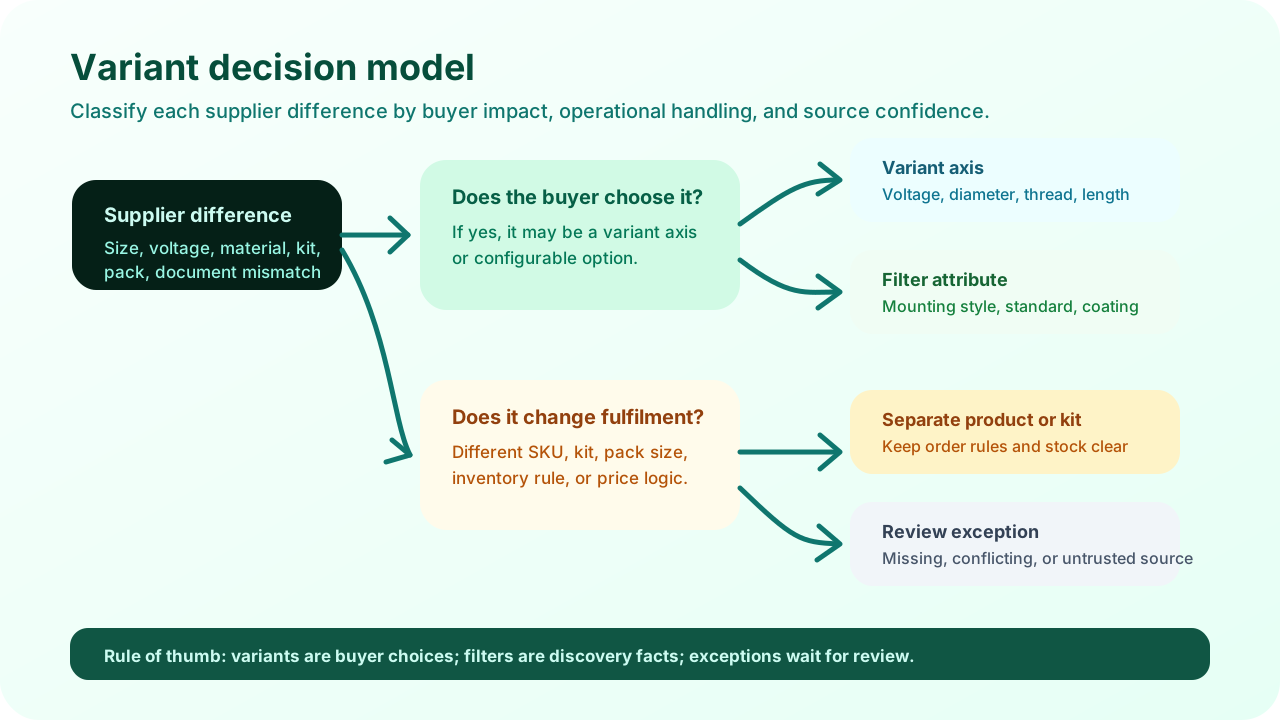
Product family: Which items belong together because buyers compare them as alternatives?
Variant axis: Which differences should buyers actively choose before ordering or requesting a quote?
Filter attribute: Which facts help buyers narrow results across many families without being options on one product page?
Separate product or accessory: Which differences change fulfilment, inventory, pricing, kit content, or compatibility enough to deserve their own product structure?
Review exception: Which rows should stay out of ecommerce until a person resolves missing, conflicting, or suspicious source data?
This model keeps the catalog usable. It also prevents a common mistake: forcing every specification into a variant picker. A product page with twelve option dropdowns is not buyer-friendly if most of those choices should have been filters, descriptions, or separate products.
A good variant structure reduces buyer uncertainty. A bad one simply moves the confusion from the supplier PDF into the web store.
A practical example: one family, four different outcomes
Imagine a distributor importing a supplier family of industrial power modules. The supplier table includes voltage, mounting style, enclosure material, certification, replacement kits, and optional clamps. It is tempting to create one huge configurable product, but the ecommerce structure should be more precise.
Supplier difference | Better ecommerce treatment | Why it matters |
|---|---|---|
24V vs 48V | Variant axis | The buyer chooses voltage before quoting or ordering. |
DIN rail vs panel mount | Filter attribute or variant axis | Depends on whether buyers compare mounting inside one family or across many families. |
Clamp kit included | Separate product or accessory | Kit contents, stock, and price may differ from the base item. |
Certification missing in PDF | Review exception | Do not publish a compliance-sensitive claim without a trusted source. |
This is where product data automation needs human review. AI can extract rows, detect repeated patterns, suggest normalized attributes, and flag likely family groupings. But the final variant model should reflect buyer behavior and operational rules, not just string similarity.
Where ERP, PIM, and ecommerce teams get misaligned
ERP data is usually SKU-first. PIM teams often think in product families, attributes, channels, and governance. Ecommerce teams care about search, comparison, merchandising, and conversion. Sales teams care whether the page prevents wrong orders and unnecessary clarification calls. Variant work sits at the intersection of all four.
Problems appear when one system’s structure is treated as the truth for every other system. ERP may know the sellable item but not the buyer-facing option label. A PIM may store rich attributes but still need upstream cleanup before import. The ecommerce platform may support variants and metafields, but it cannot decide whether “kit included” is an option, accessory, or separate page.
A safer approach is to use a staging layer before publishing. Store the supplier value, normalized value, canonical unit, proposed family, proposed variant axis, source reference, and review status. Only approved rows should move into the channel-specific import.
A variant readiness checklist for distributors
Before importing a large supplier family into your ecommerce platform, review these questions:
Buyer clarity
Can a buyer compare items without understanding supplier model-code logic?
Are option labels written in buyer language?
Are filters consistent across related categories?
Does the page avoid overwhelming dropdowns?
Operational trust
Do SKU-level facts still map back to ERP and source documents?
Are kits, accessories, and replacements separated where needed?
Are uncertain attributes flagged for review?
Can sales see why a product was grouped or separated?
If the answer is “not yet,” the issue is usually not the ecommerce template. It is the product data model behind the template.
How Arovon fits into the workflow
Arovon helps distributors turn supplier PDFs, spreadsheets, and catalog documents into structured product data that can be reviewed before it reaches ecommerce. For variant-heavy families, that means extracting repeated rows, normalizing attributes and units, preserving source references, and creating a review workflow around family and variant decisions.
The goal is not blind automation. The goal is to reduce manual spreadsheet work while keeping catalog managers and sales teams in control of the decisions that affect buyer trust. Once the structure is approved, the cleaned data can support product pages, filters, metafields, PIM imports, or ecommerce staging tables.
If your team is preparing a distributor catalog for self-service buying, start with one messy product family. Use it to define the variant rules, review exceptions, and export format before scaling the workflow across suppliers.
Want to see how supplier documents can become ecommerce-ready product data? Request a demo, review pricing, or contact Arovon to discuss a focused product-data pilot.