Why Ecommerce Search Fails for Industrial Products
6/29/2026
Industrial ecommerce search often fails because the catalog data was never structured for how technical buyers search. Here is how distributors can diagnose and fix the product-data layer behind search.
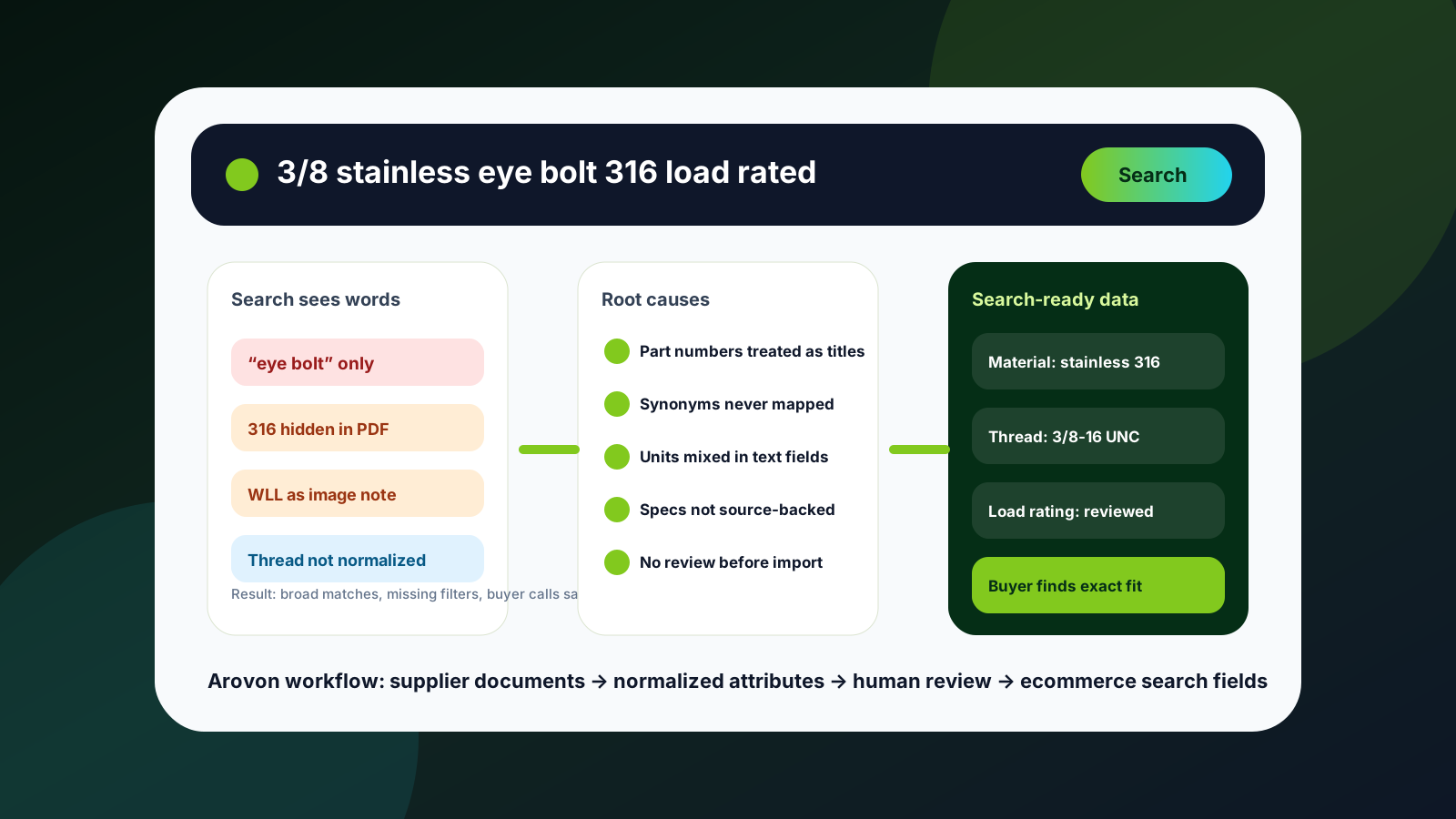
A buyer searches for a 316 stainless eye bolt, a metric tapered roller bearing, or a food-grade O-ring. The product exists in the catalog. Sales can find it. The supplier PDF contains the right specification. But the ecommerce search page returns a weak match, too many broad results, or nothing useful at all.
That is rarely just a search-engine problem. For industrial distributors, search usually fails because the underlying product data was never prepared for the way technical buyers search. The search box can only work with the fields, synonyms, attributes, categories, units, and review decisions it receives.
This guide explains the most common reasons industrial ecommerce search breaks and how to fix the product-data layer before blaming the storefront.
Quick skim: what usually breaks search
Technical buyers search by application, part number, material, dimensions, standards, manufacturer terms, and shorthand — not only by product title.
Supplier PDFs often contain the right facts, but those facts are trapped in tables, notes, images, and inconsistent units.
ERP item records are operationally useful but often too thin for ecommerce discovery, filters, and comparison.
Search tuning helps only after the catalog has normalized attributes, mapped synonyms, reviewed specs, and buyer-facing category logic.
1. Product titles carry too much responsibility
Many distributor catalogs ask the product title to do nearly everything: identify the item, hold the brand, include important specs, support keyword search, and still look clean on a category page. That is too much work for one field.
A title like “Eye Bolt SS 3/8” may be obvious to an experienced salesperson, but it may not match searches for “stainless steel lifting eye,” “316 eye bolt,” “marine eye bolt,” or “3/8-16 UNC eye bolt.” The title may also omit load rating, thread length, standard, or finish, even though those facts are required to choose the right product.
The fix is not to create impossibly long titles. The fix is to move facts into structured fields: material, grade, thread, diameter, standard, load rating, finish, product family, and compatible applications. Then the title becomes readable while search and filters use the structured data behind it.
2. Supplier language and buyer language do not match
Industrial products often have several valid names. A supplier may say “socket head cap screw.” A buyer may search for “Allen bolt.” One manufacturer may use “EPDM seal,” while another uses a compound code. A maintenance buyer may type a machine-specific phrase that never appears in the catalog.
If the catalog stores only supplier language, search becomes brittle. The buyer has to guess the exact words used in the source file. That is not realistic for a self-service experience, especially when buyers compare products across manufacturers.
Create a controlled synonym layer by product family. Include manufacturer terms, common trade names, abbreviations, spelling variations, and internal sales language. Keep it governed: synonyms should help discovery, not create false matches between products that are technically different.
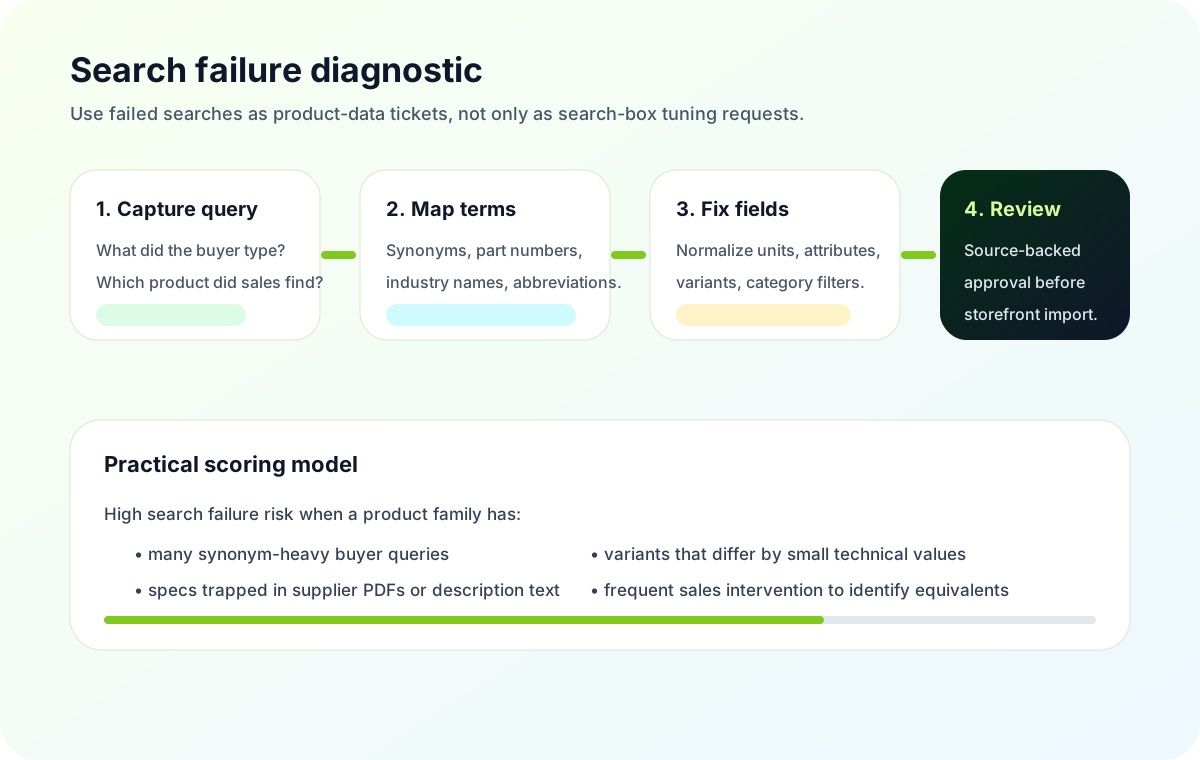
A failed search query is often a product-data ticket in disguise. Treat it as evidence that a buyer concept is missing from the catalog model.
3. Important attributes are hidden inside descriptions
Search fails when critical selection data is buried in paragraph descriptions, PDF notes, or long specification strings. The storefront may display the text, but it cannot reliably filter, rank, compare, or answer precise buyer queries from it.
This matters in categories where small differences determine fit: bearings, seals, fasteners, springs, tooling, electrical components, hose fittings, and safety products. A buyer does not just want any “stainless bolt.” They may need a specific thread, grade, length, head style, certification, package quantity, or compatible environment.
When Arovon works with supplier documents, the useful goal is not simply text extraction. It is turning source-backed facts into fields the ecommerce platform can use. That means extracting attributes, normalizing names and units, routing uncertain values for review, and exporting data in a structure that Shopify, BigCommerce, Adobe Commerce, a PIM, or an ERP-connected storefront can actually consume.
Symptoms shoppers see
Search returns hundreds of broad results for a precise query.
Filters disappear or show inconsistent values within the same category.
Equivalent products are hard to compare across manufacturers.
Buyers abandon self-service and email sales with screenshots or part numbers.
Product-data causes to inspect
Attribute values are stored in descriptions instead of fields.
Units, abbreviations, and manufacturer names are not normalized.
Category-specific attributes were never modeled for ecommerce.
Supplier source facts were imported without a review workflow.
4. Part numbers are indexed but not understood
Part-number search is essential in industrial ecommerce, but it is easy to overestimate what it solves. A buyer may have a complete manufacturer part number, a partial number, an old number, a distributor SKU, a competitor reference, or a number copied from a maintenance sheet with spaces and punctuation removed.
If the storefront treats every identifier as a single title keyword, matches become inconsistent. The same product may have a manufacturer part number, internal SKU, supplier code, UPC or GTIN, legacy reference, and alternate replacement. Each identifier needs a clear role and normalization rule.
A practical model separates exact identifiers from searchable aliases. Exact part numbers should support precise matching. Aliases and replacements should be reviewed so they improve discovery without implying technical interchangeability where none exists.
5. Filters are built from messy values
A filter is only useful when its values are consistent. If one supplier sends “3/8 in,” another sends “0.375 inch,” and a third sends “3/8"”, buyers see clutter instead of clarity. The same problem appears with materials, finishes, certifications, pressure ratings, voltage, tolerance, and packaging.
This is why ecommerce search work should include a normalization pass before import. Choose canonical units, define allowed values where possible, and preserve the original source value for traceability. When a value is uncertain, flag it for review instead of guessing.
For teams planning a bigger relaunch, this work should happen before the new site goes live. A good starting point is Arovon’s product data cleanup checklist, which frames catalog readiness as a launch workstream rather than a last-minute import task.
6. Search logs are not connected to catalog operations
Search analytics are useful only when someone can act on them. Many distributors can see failed searches, but the findings stay with marketing or the ecommerce platform owner. The catalog team never receives a structured task: add synonym, normalize attribute, split category, review missing spec, or update replacement mapping.
Build a simple monthly search-quality routine. Review the top zero-result queries, high-volume low-conversion queries, and searches that lead to contact forms or quote requests. For each one, decide whether the problem is search configuration, category structure, missing product coverage, or product data quality.
If the product exists but is not found, inspect synonyms, titles, identifiers, and indexed attributes.
If the product appears but cannot be narrowed, inspect category-specific filters and unit normalization.
If buyers compare the wrong products, inspect variant logic and compatibility attributes.
If sales keeps answering the same product-identification questions, inspect which source-backed specs are missing from ecommerce fields.
A practical fix: start with one search-critical product family
Do not begin by trying to perfect the whole catalog. Choose one product family where failed search creates visible pain: frequent sales calls, high quote volume, many variants, or a planned ecommerce category push. Fasteners, bearings, seals, springs, and tools are common starting points because buyers rely on precise attributes to identify fit.
For that family, collect supplier PDFs, spreadsheets, ERP fields, sales notes, and search logs. Build a compact attribute model: what belongs in the title, what should become a filter, what should become a variant, what should stay in the description, and what should be stored as source evidence. If that decision is unclear, use Arovon’s guide to product attribute strategy as a working framework.
Then run a review-first workflow. Extract candidate fields from supplier documents, normalize values, highlight uncertain specs, let a knowledgeable person approve the data, and export only reviewed records to the ecommerce system. This creates better search without pretending that technical product data can be blindly automated end to end.
Where Arovon fits
Arovon helps distributor teams turn supplier PDFs, spreadsheets, and catalog files into structured product data for ecommerce and catalog operations. The value is not just faster extraction. It is the repeatable workflow between messy source documents and searchable, reviewable, export-ready product records.
If ecommerce search is failing because your catalog lacks normalized attributes, source-backed specs, or buyer-language synonyms, start with a focused pilot. Pick one product family, define the fields search needs, and measure whether buyers can find and compare the right products with less sales intervention.
To discuss a pilot, visit request a demo, review the pricing page, or contact Arovon with a sample supplier document and the product family you want to improve first.