How to Build a Product Data Review Workflow That Sales Teams Trust
6/30/2026
A practical guide for distributors that want sales teams to trust extracted and enriched product data before it reaches ecommerce, quoting, or customer self-service.
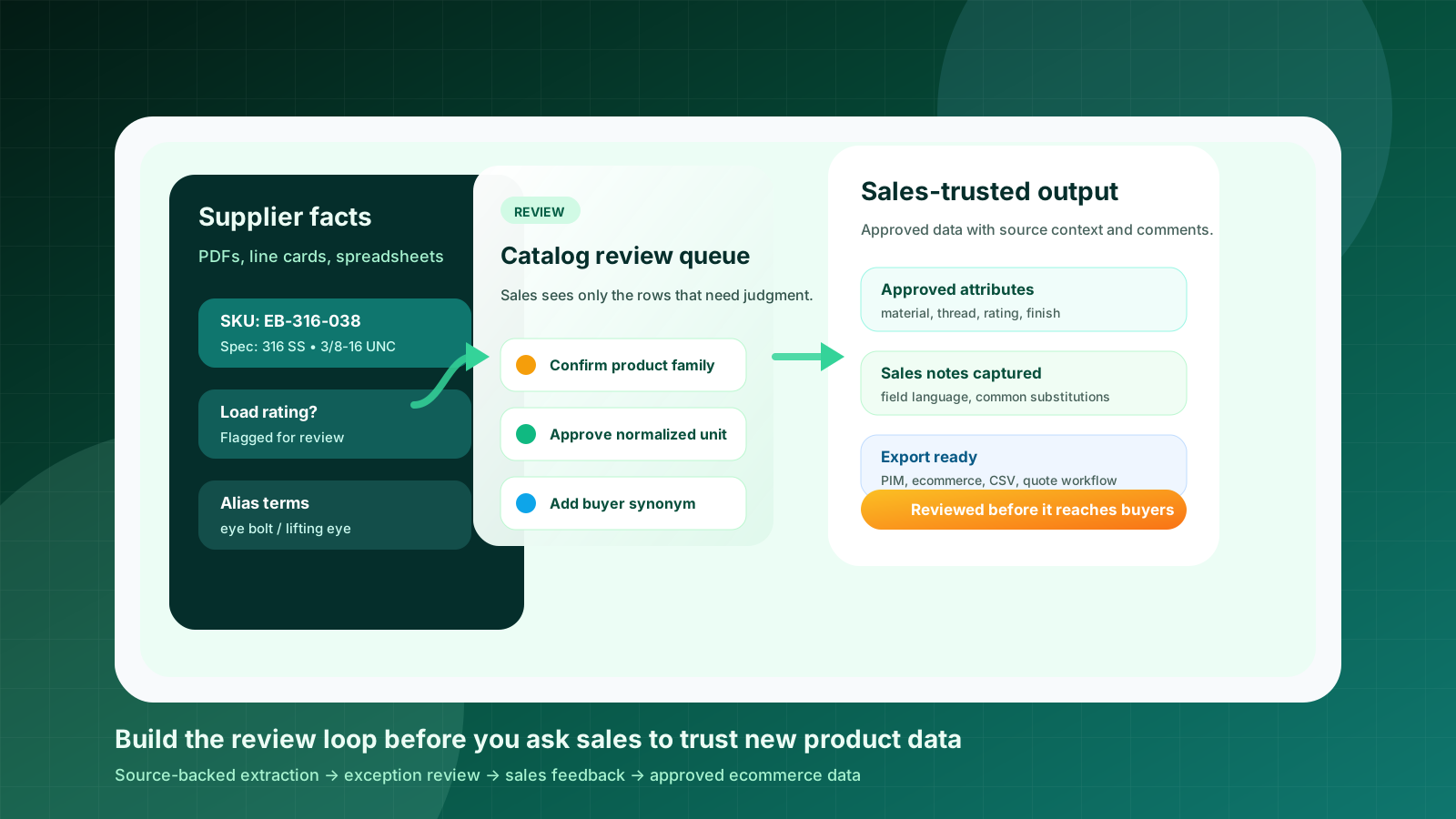
Sales teams usually do not reject new product data because they dislike automation. They reject it because they have seen what happens when a questionable specification, wrong unit, vague product family, or missing source note reaches a customer. One bad row can create a wrong recommendation, a delayed quote, or a buyer who stops trusting the ecommerce catalog.
That is why product data automation for industrial distributors needs a review workflow, not just an extraction workflow. Supplier PDFs, spreadsheets, and line cards can be transformed into structured product records, but the business value appears only when the right people can review exceptions quickly and trust what gets published.
This guide explains how to build a practical review loop that sales, ecommerce, and catalog teams can use together. It is especially useful before a website relaunch, a self-service catalog project, or a new PIM/ecommerce import.
Quick skim: the workflow sales teams usually trust
Keep source context attached to every extracted fact: supplier, page, row, table, and original wording.
Route only the uncertain decisions to sales instead of asking them to approve an entire spreadsheet.
Separate factual validation from merchandising decisions such as titles, filters, categories, and synonyms.
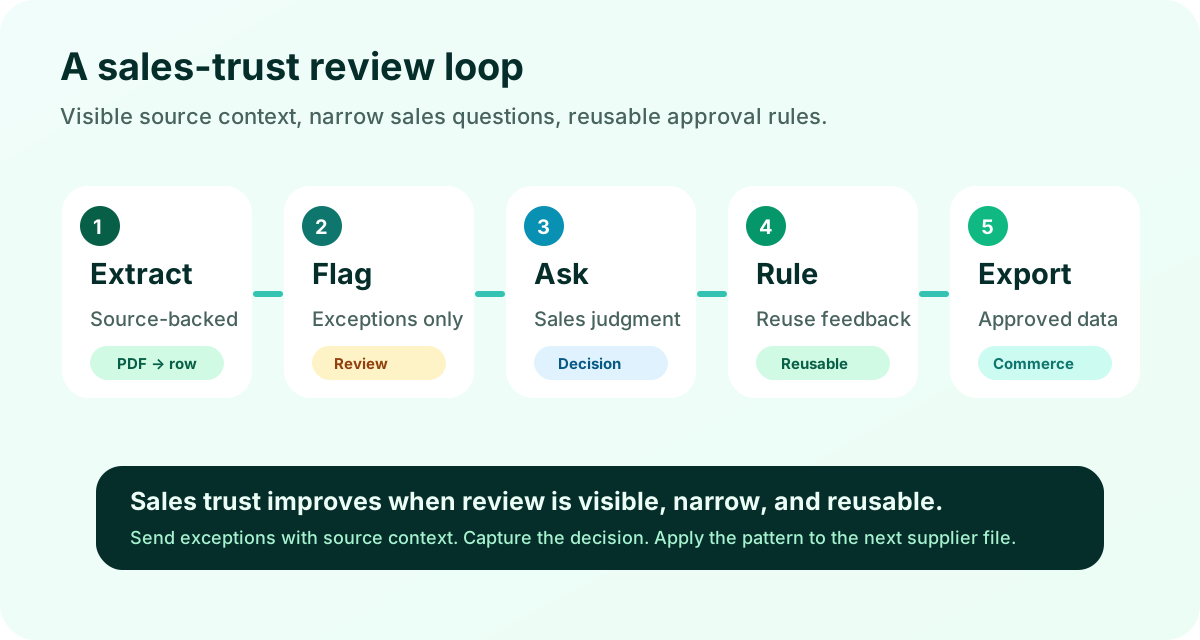
Capture reviewer comments as reusable rules so the next supplier file improves instead of restarting from zero.
Publish only approved records to ecommerce, quoting, PIM, CSV, or ERP-adjacent workflows.
Start with the real trust problem
Many distributors frame the problem as “sales will not adopt the new data.” The better question is: what would make a salesperson comfortable using the data in front of a customer?
For a technical product catalog, trust usually depends on three things. First, the person reviewing a field must know where the value came from. Second, the workflow must make uncertainty visible instead of hiding it in a clean-looking spreadsheet. Third, corrections must survive the individual review session so the same mistake does not repeat across every supplier file.
This is different from asking sales to become the data-entry department. Sales expertise is most valuable where product context matters: whether a supplier abbreviation maps to a known product family, whether a field term is buyer language or internal shorthand, whether a substitute item should appear as a related product, or whether a spec is safe to expose before confirmation.
Weak review process
“Can you check this spreadsheet?” Sales receives hundreds of rows, little source context, and no clear decision boundary. Feedback arrives as comments, email threads, or ignored edits.
Trusted review process
Sales receives a short exception queue: missing rating, conflicting unit, uncertain category, or synonym decision. Each choice is tied to source evidence and becomes a reusable rule.
1. Keep every extracted value source-backed
The fastest way to lose sales confidence is to present extracted product data as if it appeared from nowhere. A value such as “316 stainless steel,” “3/8-16 UNC,” or “IP67” may be correct, but reviewers need to see the supplier document, page, table heading, footnote, or row context that supports it.
A good review record should show the drafted value, the original source wording, the source location, the confidence or reason for review, and any normalization applied. If the system changed “SS 316” to “316 stainless steel,” the reviewer should understand that it was a normalization decision, not a hallucinated improvement.
This is one reason generic spreadsheet cleanup often breaks down for industrial catalogs. The spreadsheet may contain a clean value, but the reviewer has to open the PDF again to decide whether the value is safe. Source-backed review reduces that back-and-forth.
2. Create exception queues, not approval marathons
Sales teams are busy. If the review workflow asks them to inspect every product field, adoption will fail. The better design is to route only the rows or fields where human judgment changes the outcome.
Common exception types include missing units, conflicting values across supplier files, ambiguous abbreviations, low-confidence table extraction, uncertain product family, possible duplicate part numbers, and buyer-facing language choices. Ecommerce and catalog teams can review formatting and completeness. Sales should see the narrow questions where their customer or application knowledge matters.
A review workflow earns trust when it makes uncertainty visible without turning sales into the cleanup team.
3. Separate facts from merchandising decisions
Industrial product data has factual fields and presentation fields. Mixing them creates confusion. A factual field might be diameter, material, pressure rating, voltage, thread pitch, load capacity, or manufacturer part number. A presentation decision might be product title, category placement, filter label, tag, synonym, or short description.
The distinction matters because different people should review different decisions. Technical sales may be best for application language and risky substitutions. Ecommerce may own titles and filters. Operations may own SKU and ERP alignment. The workflow should reflect those roles instead of pushing everything into one approval column. For search-specific cleanup, see why ecommerce search fails for industrial products.
Facts need source evidence and validation rules.
Presentation fields need buyer language, consistency, and category logic.
Export fields need destination-specific requirements for Shopify, BigCommerce, Adobe Commerce, PIM, or CSV import.
Review status needs to show who approved what and when.
4. Capture sales feedback as rules
The biggest missed opportunity in manual catalog cleanup is that corrections often disappear into one file. A salesperson fixes “zinc plated” to “zinc-plated steel,” changes a product family label, or adds a common buyer synonym. Then the next supplier catalog repeats the same issue.
A stronger workflow stores feedback as reusable rules: synonym mappings, unit normalization, product-family decisions, category exceptions, title patterns, and review thresholds. The goal is not to remove human review entirely. The goal is to make every review session improve the next one.
This approach also helps with accountability. If sales worries that ecommerce data will drift, the team can point to the approval history and the rules behind a value. That is more credible than saying “the AI said so.”
5. Define “approved” before export
Approval should not mean “someone looked at the spreadsheet.” It should mean the product record meets a clear standard for its destination. A quote-support dataset may need source-backed specs, normalized units, and internal notes. An ecommerce product page may also need title, category, searchable attributes, image status, description inputs, and filter readiness.
Before exporting to a PIM, ecommerce platform, or CSV import, define the minimum approved fields for each product family. Fasteners, springs, bearings, seals, electrical components, and MRO consumables will not need the same attribute model. A workflow that respects those differences is more likely to earn sales trust than a universal template.
Review signals to show
Source page, confidence reason, reviewer, timestamp, changed value, original value, and unresolved exceptions. These make the workflow auditable.
Export signals to require
Approved status, required attributes, normalized units, buyer-facing category, title/description readiness, and destination mapping.
Where Arovon fits
Arovon is designed for the gap between supplier documents and commerce-ready product data. The workflow starts with supplier PDFs, catalog tables, datasheets, and spreadsheets, then turns them into structured rows that can be reviewed before export. See the broader product page or request a demo if you want to test the process with one real supplier file.
The important point is not blind automation. For technical product data, the practical path is extraction, normalization, exception review, approval, and export. That gives sales teams a way to trust the data because the workflow shows where it came from and how it was approved.
A simple pilot plan
Start with one product family and one supplier file that sales already knows is painful. Define the required attributes, identify the destination format, and agree on who reviews which exception types. Then compare the reviewed output against your current manual process.
Pick one supplier catalog section, price list, datasheet pack, or spreadsheet.
Define the product-family attributes and the fields required before export.
Process the source file into draft rows with source context attached.
Route only exceptions to sales and capture their decisions as rules.
Export approved rows and measure review time, rework, and confidence.
If your team is planning a catalog cleanup, supplier onboarding program, or self-service ecommerce push, Arovon can help you build the review loop before bad data reaches customers. Request a demo with one real supplier file and the destination fields your team needs.